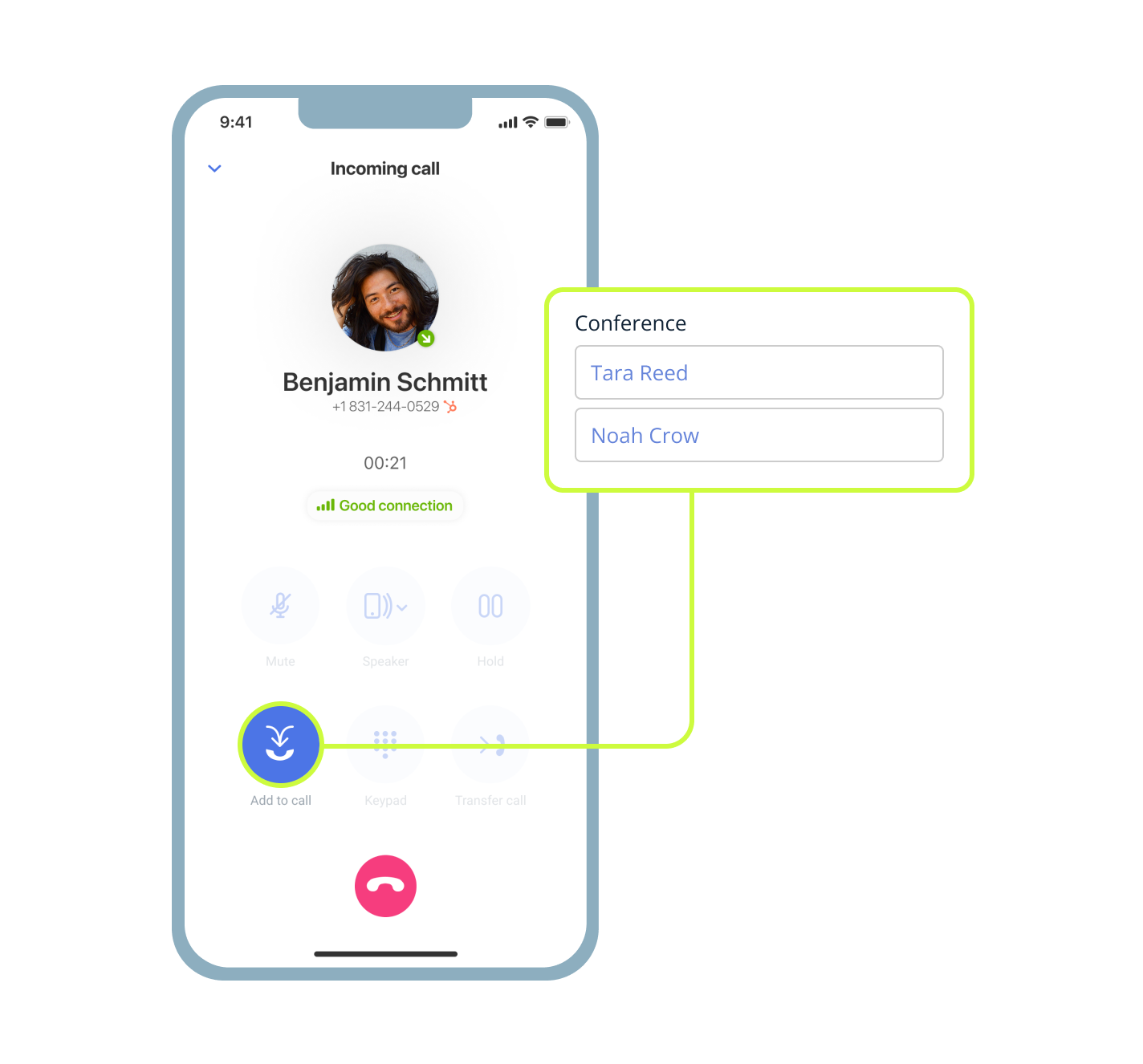

What is a three-way call?
A three-way call starts as a normal talk between two people. But you then add a third participant so you can talk to two people at once: everyone can hear and speak together in one shared discussion. You do not have to set up a conference bridge, and there is no advance scheduling needed; it’s not really a conference call, after all. It all happens inside the call you are already on.
This call feature really matters for small and mid-sized businesses. It removes the usual delays that hold back progress. You bring the right person in right away instead of promising to loop them in later. Questions get answered on the spot. Decisions happen while context stays fresh and deals move forward without extra steps.
Best for:
- Quick approvals
- Fast escalations
- Looping in an expert
Three-way call vs conference call: what is the difference?
Many people use these terms as if they mean the same thing. In practice, they serve different purposes especially when speed and simplicity matter most in daily work.
When you make a three-way call, it’s usually fast and informal. It fits small groups well. You are already speaking with someone. You realize another voice is needed and you add that person in seconds.
No calendar invites, no slide decks, and no waiting time. It works best when an immediate answer or approval can help keep the convo alive.
Conferencing, by contrast, is planned and structured. It usually involves more people, and the person “in charge” usually has certain abilities, like being able to mute other participants. You schedule it ahead, send out details, and often prepare an agenda or materials to avoid awkward moments like a dial tone or a busy signal. It suits team updates or formal reviews but would be too much for one simple question. Use a quick group call when speed matters more than slides.
| Feature | Three-Way Call | Conference Call |
|---|---|---|
| When to use | Immediate need small group | Planned discussion larger group |
| Setup time | Seconds | Minutes to days |
| Best for | Approvals escalations | Reviews training announcements |
| Scheduling required? | No | Usually yes |
Benefits of three-way calling for business phone communication
The ability to add another participant to a call turns regular phone conversations into efficient collaboration opportunities. It saves time, reduces the need for extra meetings, and improves customer satisfaction along with internal teamwork.
Faster answers during live calls
Waiting for a reply stalls deals and leaves customers impatient. With three-way calling, you add a teammate, manager, or expert right away to handle objections, confirm details, or approve next steps without dropping the original caller. You:
- Reduce callbacks because questions get answered on the first try
- Shorten decision time and keep strong momentum
Fewer scheduled conferences and callbacks
Constant calendar juggling creates meeting fatigue and lost context. A three-way call lets you resolve the issue instead of booking a callback to discuss something small.
Before, you tell the customer you need to check with accounting and promise to call back. After, you add the accountant, get the answer immediately, and move forward together.
Better customer and teammate experience
Customers dislike repeating their story. Teammates dislike chasing details through scattered emails.
The feature keeps every call participant in one conversation with full shared context. It supports smooth professional handoffs (without dropping the call) that feel natural, rather than abrupt.
Maintain context and reduce costly misunderstandings
Everyone hears the same information at the same moment. This means you avoid the he said/she said situations and the extra clarification emails that follow. The outcome includes fewer errors, clearer next steps, and handoffs that protect your reputation and your results.
Controls that keep your call professional and on track
With MightyCall, you remain fully in control throughout the call, with options like self-mute. MightyCall gives you simple tools to manage privacy, focus, and flow, so every conversation stays polished from start to finish.
Put callers on hold without ending the conversation
You sometimes need a private moment with the third person before merging calls. Here, you can place the original caller on hold, consult the second person, then merge the calls (think of it as a call transfer, but you are transferring the calls together). Privacy remains protected and voice communication is uninterrupted – the call never drops.
What happens if someone disconnects from a three-way call
The call does not end automatically. As long as at least two people stay connected, the call continues smoothly. You can add the disconnected call participant back if necessary without losing context or facing awkward restarts.
How to set up a three-way call with MightyCall
The process is easy, whichever device you use: desktop, mobile phone, or otherwise. No special training is needed. You simply start the call, add the new participant, and merge the calls together.
On a desk phone
Your compatible desk phone can directly connect to MightyCall’s VoIP system. Here’s how:
- Begin the call with the first party.
- Place them on hold, and briefly “exit” the existing call (while it’s still ongoing) and dial the second number.
- Once the new person answers, press “Merge” to connect all parties.
That’s how you group calls on a desk phone. It’s really quite simple! Hardware controls like these keep the process fast for desk-based work.
On a desktop or web app
Open the MightyCall VoIP phone in your browser. Then:
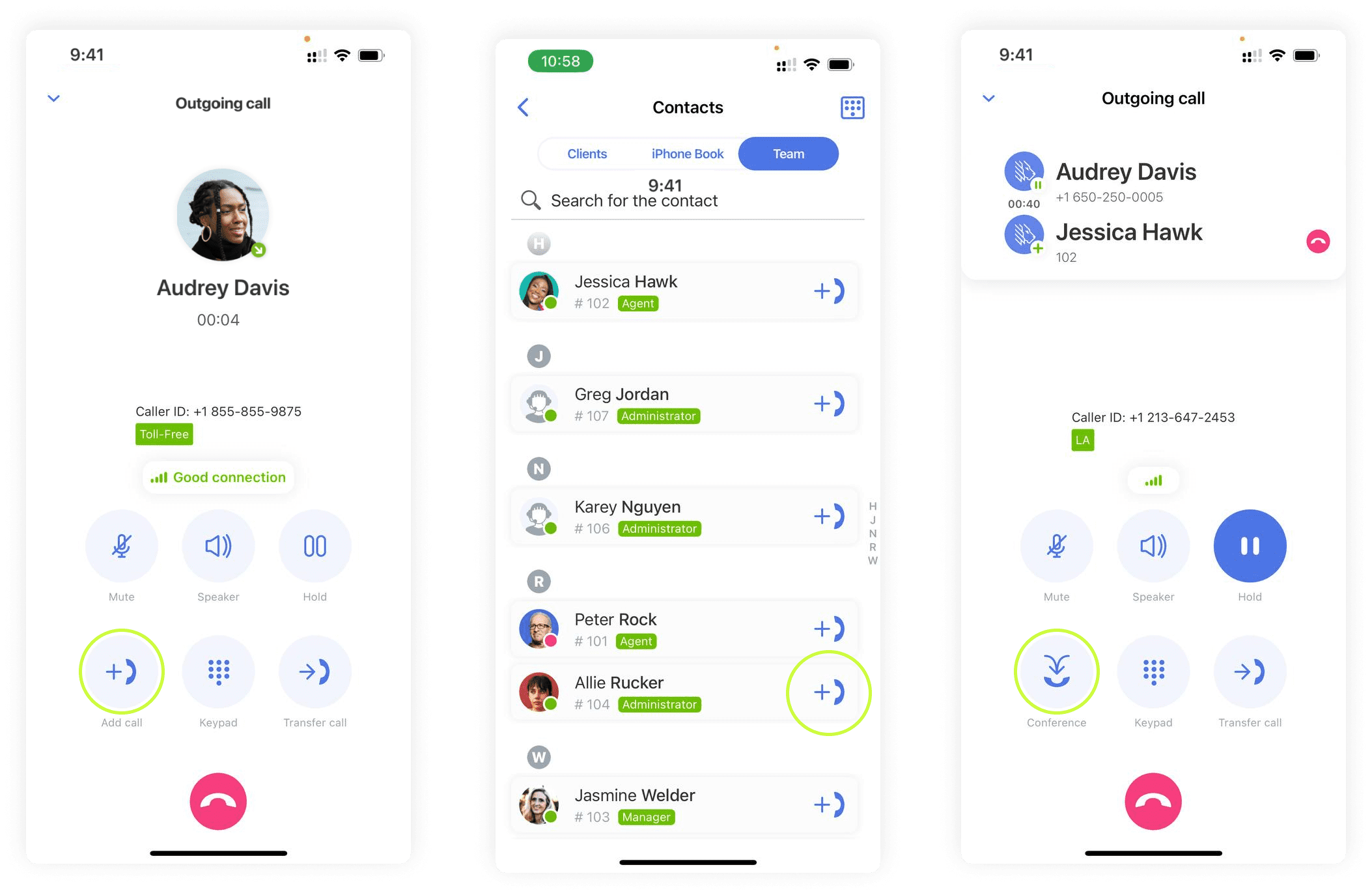
- Start the call with the first party. Click “Add to Call,” which places the first party on hold.
- Select a teammate or dial an external number. When they answer, beginning the second call, click or tap “Merge.”
- To include more, you can add callers one by one if needed.
On an iPhone
Use the MightyCall business phone app; start the call inside the app. Then:
- You tap “Add to Call” to put the first party on hold, and then call the third person.
- Once they answer, tap “Merge” to make a connection.
This lets mobile teams stay responsive, communicating entirely via their smartphone – wherever they work.
On an Android
Inside the MightyCall Android cell phone app, start the call.
- Then, tap “Add to Call”, automatically holding the first party.
- You choose a teammate, or enter a number.
- Then, tap “Merge” when ready. It’s easy!
Keep in mind though: things like signal depend on your service provider. For best results, use strong Wi-Fi.
Why choose MightyCall?
What’s the core of your work? Closing deals faster, resolving issues faster, and collaborating without extra meetings. MightyCall’s business phone system makes that straightforward for small and mid-sized businesses when a conversation needs another voice.
Built for small and mid-sized business communication
You lack a large IT team or time for complex tools. That’s ok, you’re small. MightyCall fits with real small and mid-sized workflows. It’s easy to set up, remains easy to use, and scales as your team grows. In short? It just works.
One app for calls, conversations, and collaboration
You can stop jumping between phone, email, chat, and other platforms. Calls, messages, history, voicemail inboxes, and three-way collaboration all live in one familiar interface across web, desktop, and mobile.
No complex setup or training required
Most teams become comfortable using it to make a 3-way call in minutes instead of days. The interface feels natural, and every feature – including three-way calling – behaves consistently, no matter which device you choose.
Works seamlessly across devices and locations
Remote and hybrid teams stay connected without disruption regardless of location, and records are saved to the cloud, not devices.
Features that make your 3-way calls strong
Three-way calls gain real strength from supporting tools that protect conversations, build accountability, and maintain clarity. MightyCall layers in practical capabilities that help your team work confidently and make your 3-way calls effective.
Call recording for important conversations
You can record calls for training quality checks, dispute resolution, coaching, and more. Listening back is straightforward and secure.
Recording laws differ by location, however, so obtain consent when needed and always use the feature responsibly.
Call logging for visibility and accountability
Every call logs automatically with participant details, timestamps, and outcomes. That way you can remove guesswork about who was there. Call logging means handoffs become clear, your team gains consistent visibility, and you have to deal with fewer “Wait, what happened?” conversations.
CRM integration to connect every call to context
You can link calls directly to your CRM software, such as Salesforce or HubSpot. Team members see who joined, what was decided, and the next steps, all attached to the customer record. This sort of “CRM calling” helps keep everything organized in a clear way.
Reliable phone call quality across devices
You’ll enjoy clear audio, whether participants join from a desk phone, mobile app, or web browser. For optimal results, use a headset and select a quiet environment (especially on mobile – for your sake as well as for other participants).
Compliance for business and customer conversations
Admin controls let you manage permissions, set recording notifications, and keep audit trails. The platform supports data protection standards so your calls remain professional and compliant.
Use cases by team
When a customer raises a question or a teammate needs quick input, bringing someone with the right expertise into the call can turn possible delays into fast resolutions. This approach helps fast-moving small and mid-sized teams succeed.
Sales calls: bring in the right expert before the deal stalls
A prospect voices a pricing concern or technical question during your call. No problem: you simply add your sales engineer or manager in seconds, provide the answer live, and maintain momentum. This reduces follow-ups, builds confidence, and improves close rates without booking another meeting.
Support calls: resolve issues without callbacks
A customer grows frustrated and repeats details. Instead of delay, you bring in a supervisor or specialist immediately. The customer stays on the line, feels truly heard, and gets the solution right away. Live de-escalation can improve satisfaction and lower repeat contacts.
Remote teams: unblock work without scheduling a conference
Time zones and packed calendars make collaboration difficult, especially when you need fast approval on a proposal or quick input on a design. To get it, you can start a two-person call, add the decision-maker, and complete the discussion in a single natural conversation. This cuts meeting fatigue, helps you reach decisions sooner, and supports happier teams.
Find your way – get calling today!
Faster answers. Fewer meetings. Smoother collaboration. That is what three-way calling makes possible when implemented well.
MightyCall keeps the process simple, reliable, and accessible for your entire team. Whether you are closing sales, supporting customers, or enabling remote work, you can resolve questions faster without starting a separate meeting or losing call context.
Ready to experience the difference? Start your free trial. Your next productive conversation is only seconds away.