


Designed to power small & mid-sized businesses
with advanced customer
service
and sales tools
Cloud Call Center Software
Superior call quality and exceptional customer support
MightyCall is continuously recognized as the top cloud call center software due to its reliable and intuitive nature, exceptional customer support, and ease of setup.








4x Call Volume and 10x Cheaper

Play video
“MightyCall will make the call center fit to your needs. The service is amazing and it's been a great experience.”
Jason ElsenOwner of Black Creek Management — call center for a financial organization








Full set of call center features
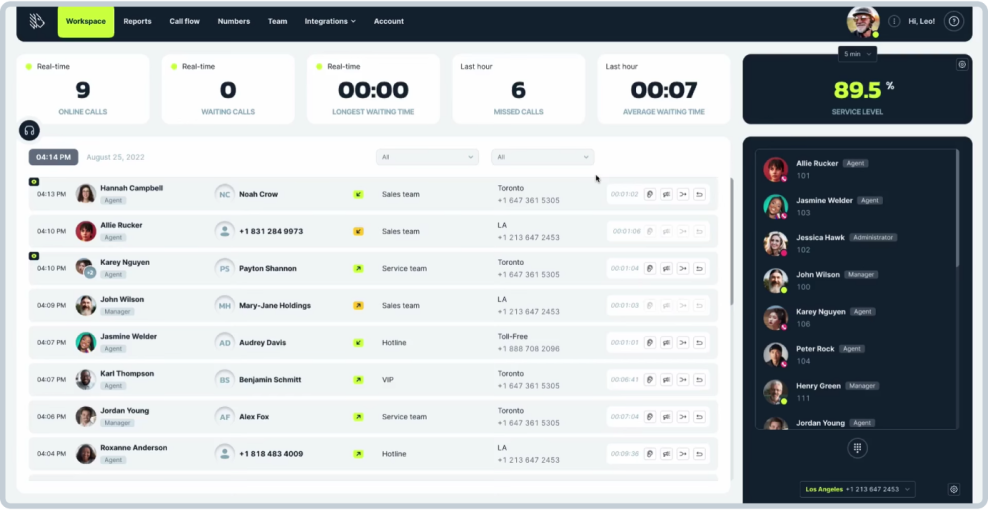
Unified agent & supervisor interface
Single, intuitive interface to manage calls and monitor performance
Automatic call distribution (ACD)
Route incoming calls to the most appropriate agents based on predefined criteria
Live analytics and reporting
Monitor real-time metrics and generate reports to track call center performance
Advanced auto dialer


Preview, progressive, and predictive dialing options to increase agent productivity and connect with more customers
Multilevel interactive voice response (IVR)
Direct customers to the right department with multi-level voice menus
Multilevel interactive voice response (IVR)
Direct customers to the right department with multi-level voice menus
Live call monitoring
Supervise ongoing calls through listening, whispering, or barging to ensure quality and provide coaching
Do Not Call (DNC) compliance
Automatically screen against DNC lists to ensure compliance with regulation
Unified agent & supervisor interface
Single, intuitive interface to manage calls and monitor performance
Automatic call distribution (ACD)
Route incoming calls to the most appropriate agents based on predefined criteria
Advanced auto dialer
Preview, progressive, and predictive dialing options to increase agent productivity and connect with more customers
Live analytics and reporting
Monitor real-time metrics and generate reports to track call center performance
Live call monitoring
Supervise ongoing calls through listening, whispering, or barging to ensure quality and provide coaching
Multilevel interactive voice response (IVR)
Direct customers to the right department with multi-level voice menus
Do Not Call (DNC) compliance
Automatically screen against DNC lists to ensure compliance with regulation
Support that goes above and beyond
Experience personalized live assistance from our expert team







Safety & legal compliance
Protect your communication with encryption, avoid fraudulent calls, set up E911, and focus on
staying FCC compliant via a direct Do Not Call Registry integration

Payment processing
Payment processing reliability is confirmed by a PCI-DSS certificate of the highest level

AWS Data protection
Amazon Web Services (AWS) Data Centers for industry-standard data protection

HIPAA compliance
MightyCall meets the strict privacy needs of healthcare professionals

FCC compliance
An FCC-backed set of protocols for calls and texts authentication

FAQ
What is cloud call center software?
Cloud call center software allows users to make calls via any modern device that
connects to the internet: a smartphone, a laptop, or a tablet. Agents and supervisors
can access the software through web browsers or dedicated applications, making it highly
versatile and accessible.
Cloud call center software allows one or multiple users to connect via cloud infrastructure to handle inbound and outbound calls and all the call center information. It usually comes with a full set of handy features, such as auto dialers, IVR, call recording, voice transcription, etc.
Cloud call center software allows one or multiple users to connect via cloud infrastructure to handle inbound and outbound calls and all the call center information. It usually comes with a full set of handy features, such as auto dialers, IVR, call recording, voice transcription, etc.
How does cloud call center software work?
Cloud-based call center software operates over the Internet, enabling businesses to
manage their operations without on-premises hardware. The software is hosted on servers
in data centers worldwide, ensuring it is always accessible. Agents and administrators
access the system via web browsers or dedicated applications.
The business call center software uses Automatic Call Distribution (ACD) to route incoming calls to the appropriate agent based on predefined rules. Interactive Voice Response (IVR) systems allow callers to interact with a menu system to direct their calls. Predictive dialing is used for outbound calls, where the system predicts agent availability and dials numbers in advance, connecting answered calls to agents.
Security and compliance are managed by the service provider, who implements measures such as data encryption and access controls. The provider also handles maintenance and updates, ensuring the software is up-to-date with the latest features and security patches.
The business call center software uses Automatic Call Distribution (ACD) to route incoming calls to the appropriate agent based on predefined rules. Interactive Voice Response (IVR) systems allow callers to interact with a menu system to direct their calls. Predictive dialing is used for outbound calls, where the system predicts agent availability and dials numbers in advance, connecting answered calls to agents.
Security and compliance are managed by the service provider, who implements measures such as data encryption and access controls. The provider also handles maintenance and updates, ensuring the software is up-to-date with the latest features and security patches.
What are the benefits of cloud-based call center software?
Cloud call center solution provides many benefits, such as the following:
- Cost savings: No need for on-premises hardware or servers, reducing capital expenditure. Pay-as-you-go pricing allows businesses to pay only for the resources they use, resulting in cost control.
- Easy scalability: Quickly add or remove agents based on call volume and business needs. Flexible resource allocation allows for adjustments without significant downtime or additional investment.
- Remote accessibility: Agents can log in from any location with internet access, supporting remote and hybrid work models. Continuous operation is ensured by allowing agents to work across different time zones.
- Real-time updates: Receive the latest features and security patches without manual intervention. Automatic upgrades keep the system current with technology advancements and compliance requirements.
- Improved disaster recovery: Data is stored across multiple data centers, ensuring backup and recovery in case of an outage. Reliable disaster recovery protocols maintain operations during emergencies.
- Reduced IT maintenance: The service provider handles server maintenance, updates, and technical support. IT staff can focus on strategic initiatives rather than routine maintenance.
How do you set up a call center phone system?
To set up a call center system with MightyCall, follow these steps:
- Choose your plan: Select a plan based on your needs, such as your inbound/outbound call center needs or team size. If you need assistance, our sales team is here to help with a white glove setup .
- Select or port your number: Choose a new number or port an existing one.
- Add team members: Add your team members to the system.
- Configure the call flow: Set up your routing rules and IVR menus.
- Integrate & test: Connect your CRM and other essential tools, then test the system to ensure everything works the way you like it. For any help, book a free onboarding session .
How much does MightyCall cost?
MightyCall offers
various pricing plans
for different business needs and sizes, starting at $15 per user/month (billed annually)
for the Core plan, up to $50 per user/month for the Enterprise plan. Each plan scales
with advanced features such as auto dialers, Live call monitoring, and custom
integrations.
What to look for in cloud call center features?
When looking for
call center features
, consider the following:
- Auto dialers : Increase productivity with three types of auto dialers: predictive dialers , which use algorithms to predict agent availability and call multiple numbers ahead of time to maximize talk time; power dialers , which automatically call one contact at a time for each available agent, only moving to the next number once the current call has ended; progressive dialers , which are similar to power dialers but with controlled calling speed to match agent availability; and preview dialers , which present the agent with information about the next call beforehand, allowing them to decide whether to proceed with the call or skip to the next contact.
- Live call monitoring : Supervisors can listen to live phone calls, provide real-time feedback to agents, and ensure quality control.
- Live analytics & reporting : Access real-time data and reports to monitor performance, track key metrics, and make informed decisions.
- Call recording : Record calls for quality assurance, training, and compliance purposes.
- Standard and multi-level IVR : Implement IVR systems to guide callers through menu options, improving call management and customer experience. Multi-level IVR can handle more complex routing needs.
- Legal compliance : Ensure your call center operates within legal guidelines and industry standards to avoid penalties and maintain a trustworthy reputation.
How can I improve call center operations?
To improve call center operations, consider the following strategies:
- Use real-time analytics : Monitor performance with real-time analytics to make quick, informed decisions and address issues promptly.
- Implement advanced skills such as smart call routing : Use advanced call routing to save your agents from overworking, direct customers to the most appropriate agents, and improve resolution times.
- Integrate CRM systems : Provide agents with complete customer histories through CRM integration for personalized interactions.
- Collect feedback for continuous improvement: Gather and act on feedback from customers and agents to continually enhance processes.
- Focus on your agents: Regularly communicate with your agents to keep a pulse on how they are managing the stress, assess the weaker areas, and target them in training. Teach them how to use new features; let them practice different scenarios and skills to stay updated on best practices. MightyCall provides tools to help achieve these goals, offering features like real-time analytics, CRM integration, and sophisticated call routing options.