
What is a power dialer?
A power dialer is an automated one-to-one calling system used by sales organizations to efficiently connect agents with prospects.
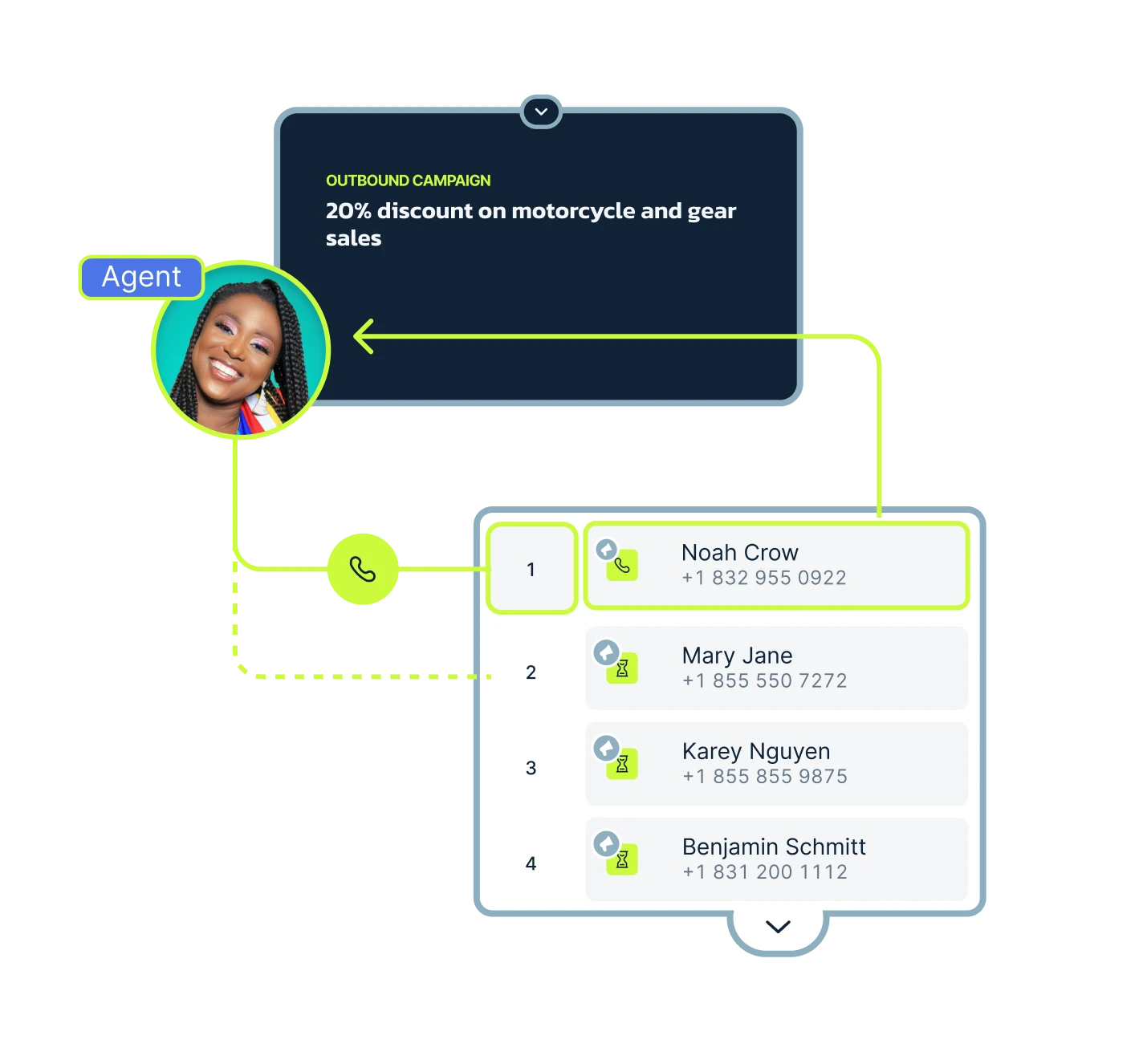
Unlike any other type of auto dialer, this one dials numbers one by one from your list, connecting the sales rep only when someone answers. This sales dialer approach significantly improves cold-calling campaigns by automatically moving to the next prospect after each call, keeping agents focused on live conversations rather than dialing.
Sales teams love power dialers because they:
- Boost connection rates with perfect timing
- Consistent calling during high-volume outreach
- Cut time wasted on manual dialing
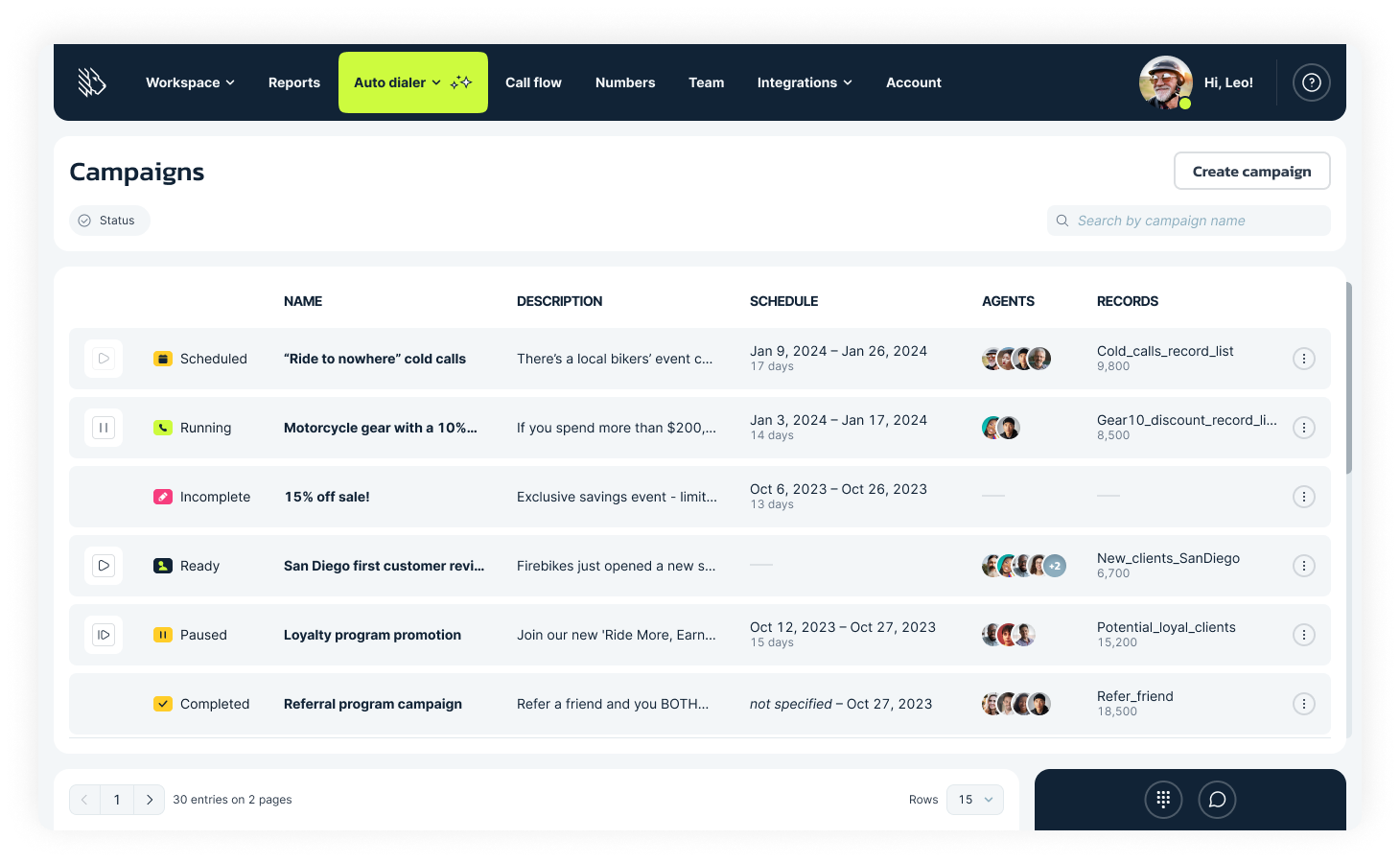
How does a power dialer work?
A power dialer automates outbound calls with sequential dialing, keeping sales reps focused on conversations rather than manual dialing.
The dialer loads your contact list and dials phone numbers one at a time. It’s a perfect synchronization of the power dialer with your CRM. Agents handle live connections immediately while automation manages the rest. Here’s how everything looks in practice:
- Import list: Upload phone numbers and lead details into the system.
- Sequential dial: The power dialer automatically calls the first number.
- Connect or skip: Live answer connects instantly with the agent; no calls go to voicemail.
- Disposition: Agent logs outcome (sale, follow-up, not interested) post-call.
- Auto-log & next: The system records everything and automatically dials the next contact.
- Decision flow: If there is no answer, use the voicemail drop feature; If you hear a busy tone, dial the next contact; If you connect, log & prompt next action.
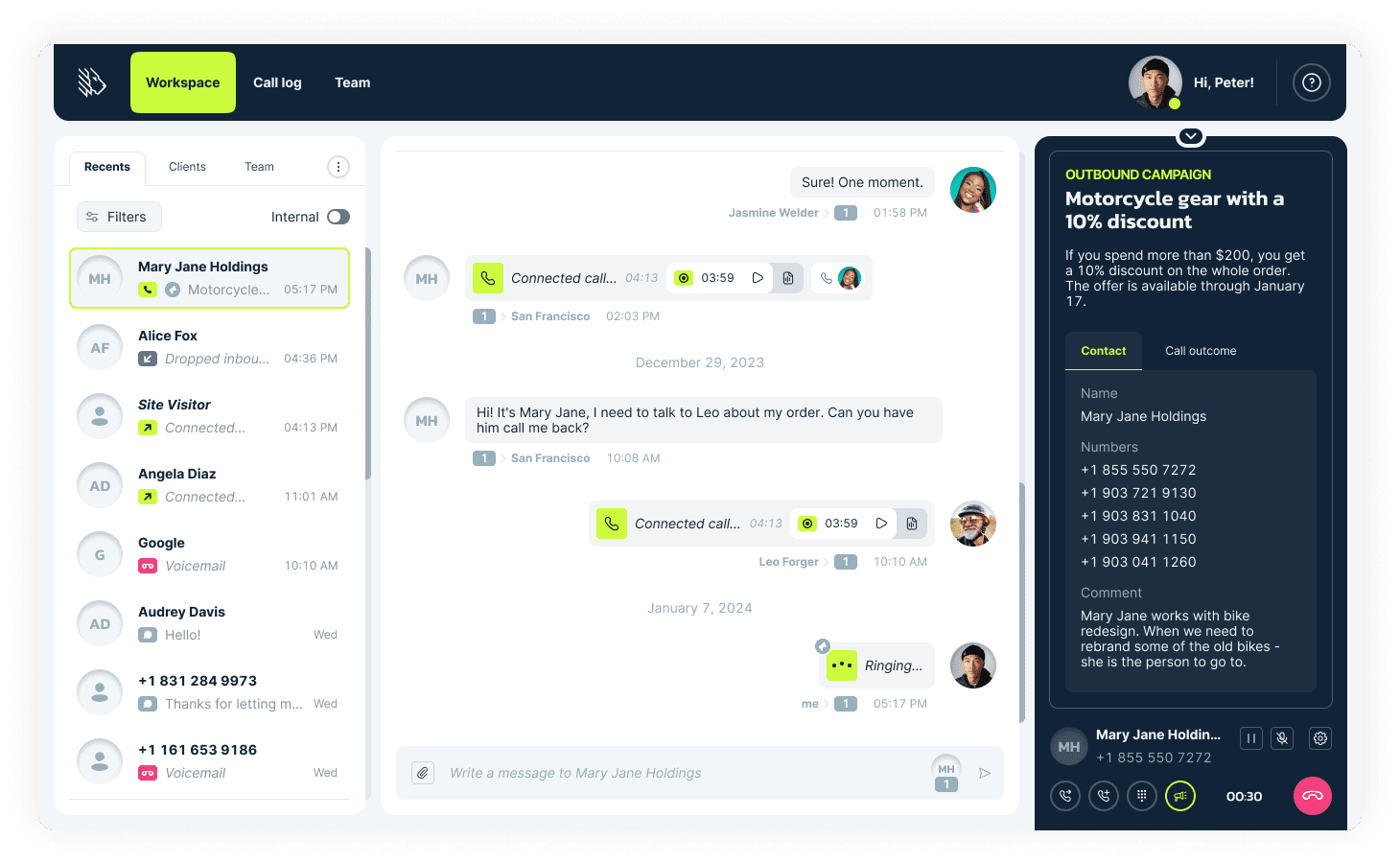
How to set up a power dialer campaign with MightyCall
Setting up a power dialer campaign with MightyCall makes calling so much easier by automating outbound calls right from your console.
This system boosts agent productivity for sales or support teams, but you’ll need admin or manager roles, verified business numbers, CRM permission scopes for contacts and calls, and a test call to confirm everything works smoothly.
Prerequisites
- Account role: Admin, manager, or custom role with dialer and integration access.
- Numbers: At least one active MightyCall business number assigned and hosted.
- CRM setup: Connect via Integrations > CRM (like HubSpot or Salesforce); flip the toggle, map outcomes, and grant scopes for contacts/calls.
- Contacts: Prepare a CSV with phone numbers, names, and notes; enable Do Not Call scrubbing.
- Test: Assign one agent, upload 5 test numbers, and run a quick campaign.
Step-by-step guide
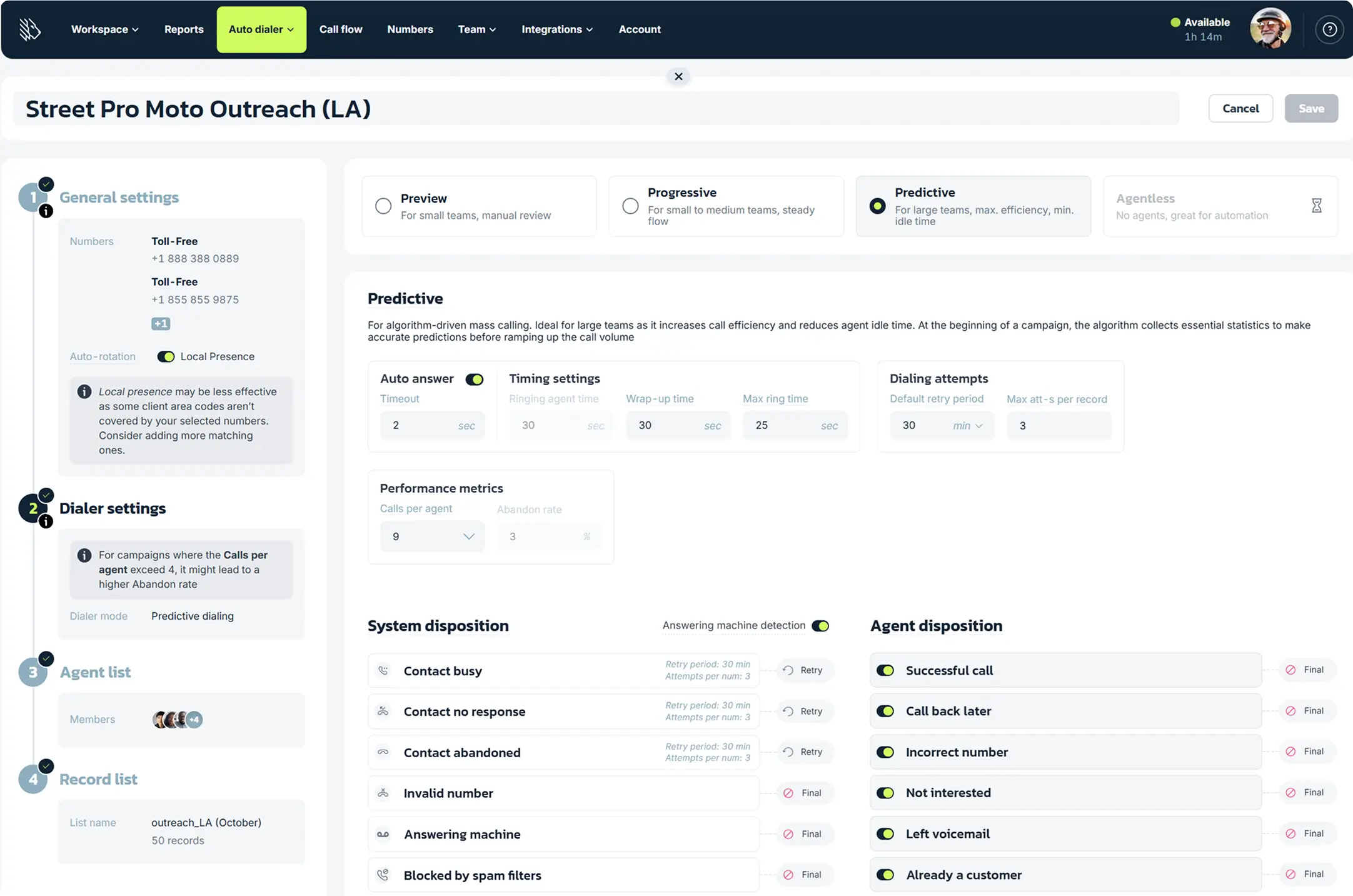
- Log into the MightyCall console, go to Auto Dialer > Campaigns > Create a campaign, and pick a dialer mode (Preview or Progressive).
- Set general settings: Name it, add time zones/schedules, turn on the Answering Machine Detection toggle (detects and disconnects voicemails in under 3 seconds, adding an “Answering Machine” system disposition), and assign numbers.
- Adjust the dialer parameters (see the table below).
- Configure agent dispositions: Toggle on desired defaults (e.g., “Successful call,” “call back later”) or add custom dispositions.
- Add agents: Check the users’ boxes and confirm their access.
- Upload record list: Import the CSV file, save, and launch.
- Test: Dial 1-2 calls, check CRM logging, review reports.
Later on, if you don’t feel like using the desktop version, you can always use MightyCall’s app.
Configuration table
| Setting | Recommended Value | Why |
|---|---|---|
| Max Ring Time | 20-30 seconds | Speeds connections without too many abandons |
| Default Retry Period | 2-3 hours | Cuts spam risk and fits contact schedules |
| Max Attempts per Number | 3-5 | Stops over-calling and meets regulations |
| Abandon Rate (Predictive) | ≤3% | Keeps pace optimal, avoids penalties |
| Wrap-up Time | 30-60 seconds | Gives time for notes and dispositions |
Time to Complete: 10-15 minutes.
Common Errors:
- No numbers/agents: Campaign shows “Incomplete”.
- High abandons: Tweak rate, ensure 3+ agents for predictive.
Top power dialer features for sales growth
MightyCall stands out as a top choice for businesses looking for reliable power dialer software. Built on years of call center expertise, it delivers everything contact centers need to boost productivity and connect with more leads. With high-availability, seamless redundancy, MightyCall delivers zero downtime, providing a strong foundation for dialer campaigns.
With preview, predictive, and progressive dialer modes, plus features such as call monitoring, local presence, voicemail drops, and call logging, agents can focus on conversations rather than manual tasks. It’s a powerful, scalable solution that helps teams eliminate idle time and get better results from high-volume outreach campaigns.
Local presence
Local presence is a powerful call center feature that automatically matches your outbound phone number to each contact’s area code, making your calls look local and more familiar. This simple change builds trust and significantly improves connection rates.
MightyCall takes this even further by supporting international calling and overlay codes to maintain a strong caller ID reputation.
Do’s:
- Rotate your number pools to prevent overuse.
- Add missing local numbers to improve match rates.
Don’ts:
- Don’t use aggressive dialing ratios with limited number pools.
- Don’t skip number health checks. Bad numbers stay bad, even with local presence.
Voicemail drop and SMS automation
Voicemail drop and SMS help automate follow-ups so reps spend less time on repetitive outreach, and they’re often packaged together as a core power dialer feature in modern dialing suites. Use features like voicemail drop to leave a consistent message the moment a call goes unanswered, then use SMS to confirm interest or a callback window.
2-step rule: Use voicemail drop when there’s no answer; use SMS for a fast “yes/no” reply or to schedule next steps. Micro-voicemail (≤20s): “Hi {Name}, {Agent} at {Company}. Calling about {topic}. Call me at {number}. Thanks.” SMS compliance: include “Reply STOP to opt out.”
Live call monitoring and coaching
Live call monitoring and coaching tools let contact center managers follow sales calls in real time, with features such as listen, intercept, whisper (private guidance to the rep), barge (join the call), and full call recording for quality assurance. Managers can provide instant, targeted feedback without disrupting the customer experience, helping reps handle objections better and improve close rates over time.
Coaching rhythm:
- Daily huddle: Review one key metric from the previous day’s reports, such as connect rate, to keep performance focused and visible.
- Weekly: Aim for 3–5 call reviews per rep, balancing standout wins with missed cues so coaching feels specific, fair, and actionable.
Compliance and privacy:
- Always disclose at the start of the conversation that calls may be recorded for quality and training purposes, using a clear line, such as “This call may be recorded for quality and training purposes,” since many jurisdictions require notice and consent for recording.
- Be mindful of both federal one-party consent rules and stricter all-party consent states, and follow the strictest applicable standard when in doubt.
CRM integration
MightyCall’s CRM integrations make the power dialer system seamless by syncing with platforms like Salesforce and HubSpot. The overall automation reduces manual work and keeps your entire team on the same page for better follow-ups.
Essential sync fields:
- Contact ID
- Owner
- Disposition
- Next step
These minimum fields ensure reliable data flow and accurate tracking across systems.
Analytics, dashboards, and performance QA
MightyCall’s analytics dashboards track both leading indicators to spot efficiency issues early, and lagging ones to measure real business impact. These insights, paired with call recording reviews, drive smarter coaching by showcasing top performers, flagging skill gaps, and keeping team goals tied to actionable QA steps.
| Leading metrics (targets) | Lagging metrics (targets) |
|---|---|
| Connect rate >45% | Meetings/hour ≥2 |
| Wrap time <60s | Talk-to-wrap ratio 3:1 |
Weekly review routine
Pull the Team Overview and Agent dashboards every Monday to analyze trends, then set your coaching focus—like dialer tweaks to improve low-connect rates—by Wednesday to keep momentum going.
Call logs & AI summaries
MightyCall’s call logs capture every detail from outbound power dialing, including direction, results, participants, duration, and notes. All of that is accessible via customizable filters and exports in the Reports tab. AI call summaries turn recordings into quick transcripts and key takeaways, so reps can review objections, sentiment, and next steps in seconds without manual typing.
This approach significantly reduces post-call work, allowing sales teams to skip tedious recaps and focus on high-value follow-ups.
Benefits of power dialers
Multi-line power dialer software like MightyCall’s transforms cold calling with automation, helping teams reach more leads more efficiently through a powerful multi-line system.
Higher connect rates
Power dialers boost connect rates over manual dialing by using local presence to match area codes and reduce hang-ups on unfamiliar numbers.
Faster outbound productivity
Automation dials next leads instantly post-call, reducing idle time and enabling reps to handle more calls per day versus 30-50 manually.
Improved data accuracy
The CRM sync and AI summaries automate logging, slashing errors, and ensuring dispositions tie directly to pipeline updates.
Consistent coaching and quality
Live monitoring, whisper coaching, and call recording standardize sales techniques across your contact center, lifting close rates through targeted QA and real-time guidance for reps.
Better pipeline visibility
Real-time dashboards in MightyCall track leading metrics, such as connect rates, giving managers clear visibility to forecast performance and optimize power-dialing campaigns on the fly.
These insights help spot trends instantly, adjust strategies, and drive better results without guesswork.
How much does a power dialing software cost?
Power dialing software for sales typically costs $20–$300 per user per month, while call center software averages $15–$100 for basic plans and $100+ for advanced features like predictive dialing. MightyCall’s competitive tiers start at Core ($25/user/mo), Pro ($45/user/mo), Power ($65/user/mo with auto dialers), and Enterprise (Custom pricing).
Most of the time, if not always, power dialers are on expensive tier plans. Pricing can range from $65 per month to $200 or more, depending on the platform providing the service. Mind you, not all call center platforms offer a power dialer option. Additionally, it’s always a good idea to look beyond the dialer to see what other features are available with it.
Case studies: how teams improved connect rates
Sales teams using power dialers have dramatically boosted connect rates by reaching more leads with targeted dialing.
Management Consulting (Large call center team)
Black Creek Management faced massive inefficiencies and $32k monthly phone bills, limiting the scale of outreach. They implemented an auto dialer with SIP trunking and call monitoring to handle higher volumes compliantly. In weeks, outbound calls surged from ~8k to 25k/day (3x+ increase), reaching 4x more prospects at 1/10th the cost.
Wakey Communications
Wakey Communications, an affordable internet provider, managed high inbound volumes and remote agents (up to 50 on queues) using manual tools, risking call quality. They adopted MightyCall’s cloud dialer with webphone, live monitoring (listen/barge), custom greetings, and quick setup to handle callbacks and QA efficiently. In months, they scaled seamlessly, while improving connections, agent confidence, and customer satisfaction.
How to choose the right power dialer software for your business?
Choosing the right power dialer for your business starts with understanding how well each option fits your team’s workflow, call volume, and CRM setup. The best system should scale easily as your sales activity grows and save your team time through smart automation and deep CRM integration.
Think about how your reps work: if they need time to review each lead, a preview dialer is ideal; if they prefer a steady pace without downtime, go for a progressive dialer; and if your team handles large-volume campaigns, a predictive dialer will help you maximize connections.
Whatever you choose, make sure the platform fully supports compliance standards such as TCPA and DNC, and includes features like local presence and STIR/SHAKEN verification to maintain trust and ensure call authenticity.
Here’s a quick 5-point checklist to evaluate your options:
- CRM fit: Seamless two-way sync, instant screen pops, and automatic call logging—no manual entry required.
- Compliance: Built-in TCPA and DNC tools, local caller ID capabilities, and verified STIR/SHAKEN protection.
- Analytics: Real-time dashboards showing call volume, connect rates, talk time, and outcomes.
- Reputation: Check reviews on sites like G2 and confirm the provider guarantees 99.99% uptime or better.
- Support: Look for 24/7 live chat and phone assistance, plus a dedicated account manager for quick resolutions.
Maximize prospects with the best power dialer software
Do you want to reach more prospects in less time? You probably do. In that case, power dialer software like MightyCall can help sales teams handle outbound calls, reduce triple-connects versus manual dialing, and slash idle time through smart automation. Features like CRM integration, local presence, and voicemail drops streamline workflows, helping you scale your pipeline reliably.
With 99.99% uptime and a strong industry reputation, MightyCall has consistently delivered strong performance. Try MightyCall today!