

Google Voice is a telephone service launched in 2009 and has since become one of the most notable business and personal online communication services. It offers two main plans – Google Voice Business vs Personal, and here you can learn about the pros and cons of each, alongside the main differences in features, prices, and purpose.
What is Google Voice?
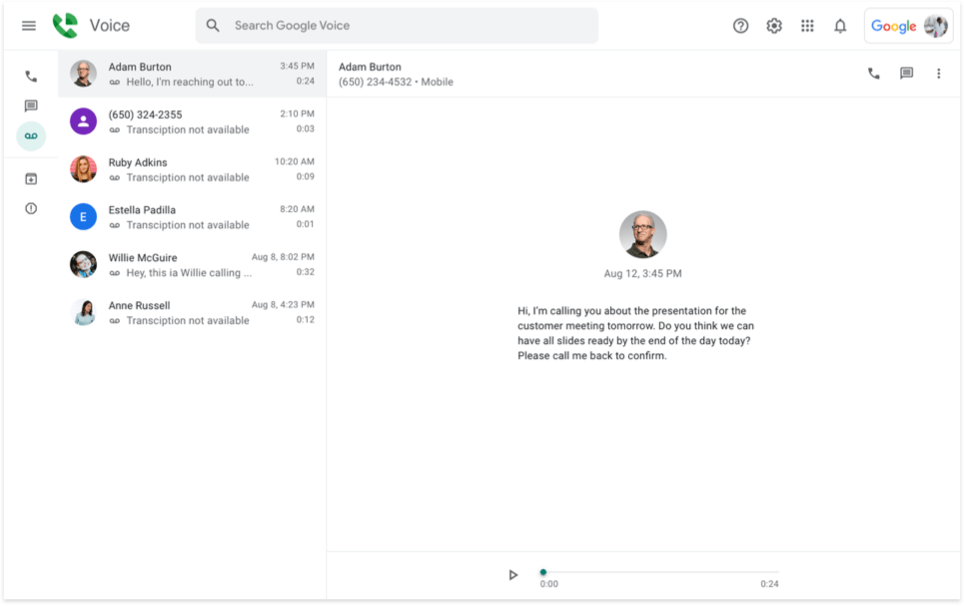
Google Voice is a wireless phone service provider that gives customers in select countries a phone number for local calls, texts, and voicemail. Naturally, it can be synced across the devices of choice: computers or smartphones. It has all the basics covered: spam filters, blacklist function, call forwarding, backups, voicemail transcription, and extra features available for purchase, such as international calling.
How does Google Voice work?
As a VoIP service, Google Voice uses Voice over Internet Protocol (VoIP) to transmit calls and messages. It is a tie-free, fully virtual calling system that lets you call from anywhere. In VoIP, voice is converted into a digital signal and transmitted over the internet, connecting people with other users. All you need is:
- A device: computer, smartphone, or tablet;
- Stable internet connection: Wi-Fi or a data plan.A
Google Voice account provides free PC-to-phone calling within the US and Canada and free PC-to-PC audio and video calls worldwide. Depending on the plan, the customer gets a virtual phone number, allowing for a full replacement of a sim card. There are two main options you will be choosing from; read more about them below.
Google Voice Personal vs Business comparison
Google Voice Personal
This type of account is available on Android, iOS, and the web, providing its customers with free, limited phone call functionality. Meanwhile, it cannot provide you with a virtual number, but it includes an integration with mail and calendar, making it best for:
- Individuals who prefer the option to call others over the internet or via a computer for convenience.
- Freelancers who need to handle and organize multiple calls from clients on the device of their choice.
- Small businesses that do not have a large volume of callsю
- Solopreneurs who manage their orders and customers on a tight scheduleю
- Anyone who enjoys the freedom of calling via the internet and multiple devices rather than being attached to a cell phone and cell service.
What are the main uses of the Personal account?
- Economy: Making a free phone call within the US. For example, if you need to talk to some customer support that will leave you hanging for an hour, and you do not want to pay for it;
- Scheduling: making a call schedule through integrating it into the calendar, if you want to make a few calls at once;
- Privacy: making sure that your own phone number remains private and unknown;
- Back-up: being able to use any phone or computer, so if you lose your phone and need to make a call from your laptop, you will be able to.
- Travel: when you go from one state to another, your service quality will depend on the internet connection, not cellular service.
Google Voice Business (Google Workspace)
The Google Voice for Business is a paid subscription-based service that provides you with a free phone number (or multiple for an extra fee) and extensive functionality (voicemail, SMS ability, and others), which is its greatest advantage. The users can communicate on any internet-enabled web-linked phone line, making it an excellent option for companies and the professional Google Voice service.
This option is best for:
- Growing small businesses: manage the small client base and other business communications in an organized way;
- Mid-sized businesses: have your team members handle the communication with the clients via multiple devices within one system;
- Solopreneurs: handling a large volume of communication in an organized manner (this option also includes text messages);
- Small research projects that require data collection via surveys.
What are the main uses for the Business option?
- Texting and calling: communication with customers or other services;
- Having a custom area code and privacy for your telephone numbers: being able to contact others without revealing your location or having to use your private, non-business phone number;
- Keeping records of business calls for documentation and follow-up purposes.
- Organization: being able to have everything in one place and not get lost in the multitude of contacts;
- Answering service for your telephone numbers: having an automated answering option that interacts with callers to prevent loss of clients.
Google Voice Personal vs Business account: pricing & plans
When comparing the two Google Voice plans, it is important to note that the personal plan is absolutely free. It is not intended for large volumes of communication; rather, it is a feature for individual use. That means you are choosing between Google Voice free vs paid.
The Google Voice for Business option was developed specifically for companies that need to manage a larger volume of calls. It is divided into 3 different tariffs:
| Starter | Standard | Premier | |
|---|---|---|---|
| Best for | Small companies | Medium companies | Enterprises |
| Text messaging | Unlimited in the US | Unlimited in the US | Unlimited in the US |
| Customer support | 24/7 forum | 24/7 forum | 24/7 forum |
| Privacy and Security | Custom and secure* | Custom and secure* | Custom and secure* |
| Locations | Up to 10 domestic | Unlimited domestic | Unlimited domestic and international |
| Maximum users | 10 | Unlimited | Unlimited |
| Price per user | $10/ month | $20/ month | $30/ month |
MightyCall solution
The Google phone system is good, but it has flaws. Unlike MightyCall, it has never been an independent business communication service specializing in virtual calls. MightyCall, however, has originally been focused solely on VoIP phone numbers and telephony (for over 15 years), which is why it offers more features (free on all the plans), such as toll-free/vanity phone numbers, extensions/call flows, and HD audio quality.
It also offers helpful customer support: daily 8 am to 8 pm EST via phone, chat, and 1-1 onboarding sessions, plus web support, for anyone who needs assistance or wants free help with setup.
Feature differences between Google Voice Personal and Business
The set of available features depends on the option you choose. Take a look at the table comparing the features of these options.
| Personal | Starter | Standard | Premier | |
|---|---|---|---|---|
| Mobile apps: iOS and Android | Yes | Yes | Yes | Yes |
| Toll-free/vanity numbers | No | No | No | No |
| Call forwarding | Yes | Yes | Yes | Yes |
| International locations | No | No | No | Yes |
| SMS | US only (with limits) | Unlimited in the US | Unlimited in the US | Unlimited in the US |
| Voicemail-to-text | Yes | Yes | Yes | Yes |
| Do not disturb based on the calendar working hours | No | Workspace-managed only | Yes | Yes |
| Desk phone compatibility | No | Yes | Yes | Yes |
| Auto attendants | No | No | Yes | Yes |
| Caller ID (Google Meet Calls) | Yes | Yes | Yes | Yes |
| Ring groups | No | No | Yes | Yes |
| Conferencing calls (3-way calling) | No | Yes | Yes | Yes |
| Call menus | No | No | No | No |
| Integrated web widgets | No | No | No | No |
| Extensions/call flows | No | No | Yes | Yes |
MightyCall solution
MightyCall clients have access to many features that Google Voice lacks. Choosing MightyCall over Google Voice allows you to:
- Try toll-free/vanity numbers – included on all the plans;
- Jump on conference calls: MightyCall knows how important it is to have team calls to ensure everyone stays up-to-date.
- Check out HD audio quality: Google Voice doesn’t support top-notch HD audio for callers and relies on Wi-Fi, which can cause a faulty connection and give your company an unprofessional reputation.
- Experience call flows and extensions: Since Google Voice was not originally developed as a wireless phone service provider, it does not offer structured call flows or a system for organizing telephone numbers.
- Enjoy the hands-down best customer support out there – MightyCall gives you fast, helpful support whenever you need it. There are no hoops to jump through or canned responses, just real people ready to solve real problems.
Google Voice Business vs Personal: users and locations
The difference between Google Voice Personal and Business is also in the number of users and locations. The Personal Plan is exclusively for the United States; the Business plan has available telephone numbers in 13 countries/regions for callers:
- Belgium
- Canada
- Denmark
- France
- Germany
- Ireland
- Italy
- Netherlands
- Portugal
- Spain
- Sweden
- Switzerland
- United Kingdom
| Users and locations | Business account | Personal account |
|---|---|---|
| Maximum amount of users | 10 to unlimited* | 1 |
| Phone number in the local country/region | 13 countries/regions* | US phone number only |
| International locations | Unlimited* | none |
MightyCall solution
If you did not find the location you are interested in on the Google Voice list, MightyCall is a good choice.
MightyCall offers 25 countries for international business phone numbers, including all those available on Google Voice. You will get a choice from: Argentina, New Zealand, Australia, Philippines, Brazil, Portugal, China, Russia, Egypt, Singapore, France, South Africa, Germany, South Korea, India, Spain, Indonesia, Switzerland, Italy, Thailand, Japan, Turkey, Mexico, United Kingdom, Netherlands, and the United States of America.
Pros & cons of Google Voice Business
When choosing between Google Voice paid vs free options, it is important to look at the multiple factors to be taken into consideration when choosing your professional communication platform:
| Pros | Cons |
|---|---|
| Price – the service is affordable and is one of the best price offers within virtual phone providers | Cannot port landline – if you want to port a landline number, you will have to transfer it to a mobile operator first |
| Port your personal phone number – for an additional $20 USD, you can port your own number or use your Google Voice Number for free | Privacy concerns – all the information will be stored on Google servers |
| Simple interface – the service has an amazing UI | No analytics – this service is yet to offer analytics to its clients |
| Growth – your business will grow once you switch from a sim card to a universal plan | Limited features – requires Google Workspace for use, which is an additional purchase, so in a way it is an addition to the GWorkspace rather than an independent service |
| G Suite – an integration will be intuitive and easy for companies using Google | Hard-to-access customer support – the forum is the main means of communication between the customer support team and clients |
| Call screening – requiring vocal identification from your callers | Limited communication channels – only voice and text services offered, no conference calls or additional features |
| Switch devices – devices can be switched during a call |
Pros & cons of Google Voice Personal
It is important to remind ourselves that this plan is absolutely free for individual use when looking at the pros and cons:
| Pros | Cons |
|---|---|
| Variety – this plan gives you an additional option on top of your cell phone | No emergency calls – you will not be able to reach 911 |
| Professionalism – having the ability to keep all your calls dubbed on your computer will help you organize your work communication | Limited locations – the feature only works in the US and with US telephone numbers |
| Price – this version is completely free | No virtual number – people will not be able to call you |
| Voicemail transcription – Google AI is a powerful tool that ensures quality in voicemail transcription | Limited users – only one person can use it |
| Calendar – adds your communication to your calendar | No organization – you will not have access to a put-together hub with all the features and all call history |
| Flexibility – allows working from any device or operating system | Limited communication channels – only voice services offered, no texting, MMS, conference calls, or additional features |
| Security – provides you with a tool to protect your number from people you are calling |
Making the right choice: Google Voice Business vs Personal
Google Voice is an affordable and functional solution for both business and personal communication. To decide which capacity you might need it in, determine your needs first. The VoIP solution provides a solid set of basic features for making virtual calls, but it lacks a few options you might need. If you are missing a few features or did not find what you needed in the phone service’s functionality, we recommend trying MightyCall.
MightyCall was created and refined over the years to meet the needs of small and medium-sized companies for virtual telephony. It is also one of the most affordable options on the market in over 25 countries and is known for providing exceptional customer support. Try it and see for yourself.