

Many contact centers track dozens of metrics. However, they still can’t answer the real questions: Are we improving? What should we do today? As customer expectations rise, channels multiply, and teams shrink. It is when solid call center reporting KPIs become your saving grace.
Without clear KPIs tied to daily actions, managers and business owners risk slow decisions, weak service, and missed opportunities. You can’t improve what you can’t measure, and you can’t lead with data you don’t trust.
Key takeaways
Good call center reporting software is not just a dashboard (unless it’s a car). Build reporting that drives action. This guide will help you turn call center data into decisions that improve KPIs, customer experience, and team alignment. You’ll learn how to focus on what matters, simplify metrics, and create a call center report that is built for serious action.
- Improve agent performance through coaching
- Reduce decision delays with clear, real-time insights
- Spot root causes behind service gaps and SLA misses
- Coach teams with consistent, outcome-based KPIs
- Avoid KPI overload by aligning metrics with business goals
- Design role-based reports for managers, executives, and managers
- Turn analytics and reporting into action for continuous improvement
This article is perfect for contact center managers, CX leaders, operations directors, and SaaS decision-makers who want reporting that drives results.
What is call center reporting?
Call center reporting is the process of collecting, organizing, and presenting performance data so leaders can see what’s happening and make informed decisions. It turns raw metrics from systems like ACDs, IVRs, and call center workforce management tools into clear reports, dashboards, and scorecards that show trends, gaps, and opportunities.
Now, let’s understand the difference between a call center and a contact center. “Call center” typically refers to voice-based operations, while “contact center” includes all customer channels – chat, messaging, email, and social media.
If done right, reporting bridges the gap between data and action. It helps managers spot what’s working, fix what’s not, and guide teams toward measurable improvement.
Call center reporting vs call center analytics
Reporting and analytics are often used interchangeably, but they serve different purposes. Understanding where one ends and the other begins helps managers choose the right tool for every challenge, be that tracking call center performance or uncovering why it’s shifting.
Key differences
Reporting is about structured KPI monitoring; analytics digs into patterns and points to the root of the problem. Reporting tells you what happened, while analytics explains why. For example, a report might show that average handle time (AHT) increased, but analytics reveal it’s due to a new issue type or a routing change.
- Reporting is routine, structured, and based on KPI.
- Analytics is more exploratory and diagnostic.
- Reporting measures outcomes; analytics explains causes.
- Reporting guides action plans; analytics refines strategy.
When reports are enough
Reporting alone works well for day-to-day control and performance reviews, when you’re tracking known metrics and need quick, confident decisions.
- Monitoring SLAs and the level of customer service in real time
- Checking staffing and schedule adherence
- Coaching agents and sharing monthly summaries with executives
When deeper analytics are required
Sometimes, standard performance metrics only scratch the surface. Analytics becomes essential when numbers like call volume, average handling time, or resolution rate don’t fully explain what’s happening. Advanced analysis helps uncover the why behind fluctuations.
You can identify trends, predict future performance, and reveal factors that influence agent productivity or customer satisfaction. By connecting data points across multiple sources, analytics allows managers to make informed, proactive decisions rather than reacting to surface-level changes.
Core call center KPIs organized by outcome
The best call center KPIs don’t just track activity; more often than not, they reveal progress toward efficiency, quality, and customer satisfaction. Each metric should tie directly to an action leaders can take today. Benchmarks are useful for direction, but always validate them against your unique volume, channels, and customer expectations.
Customer experience KPIs that improve satisfaction
Now, let’s get down to business. Key customer experience KPIs such as FCR, CSAT, NPS, and CES help call center teams identify issues and boost customer satisfaction and loyalty. What do they mean, and how can you use them? Let’s answer all these burning questions and look into each KPI in more detail.
- FCR: Use after launches or for high-volume channels to cut repeat contacts.
- CSAT: Use for post-support or purchases for quick feedback.
- NPS: Send quarterly or post-update to track loyalty evolution.
- CES: Measure after support tickets or self-service use.
First call resolution (FCR)
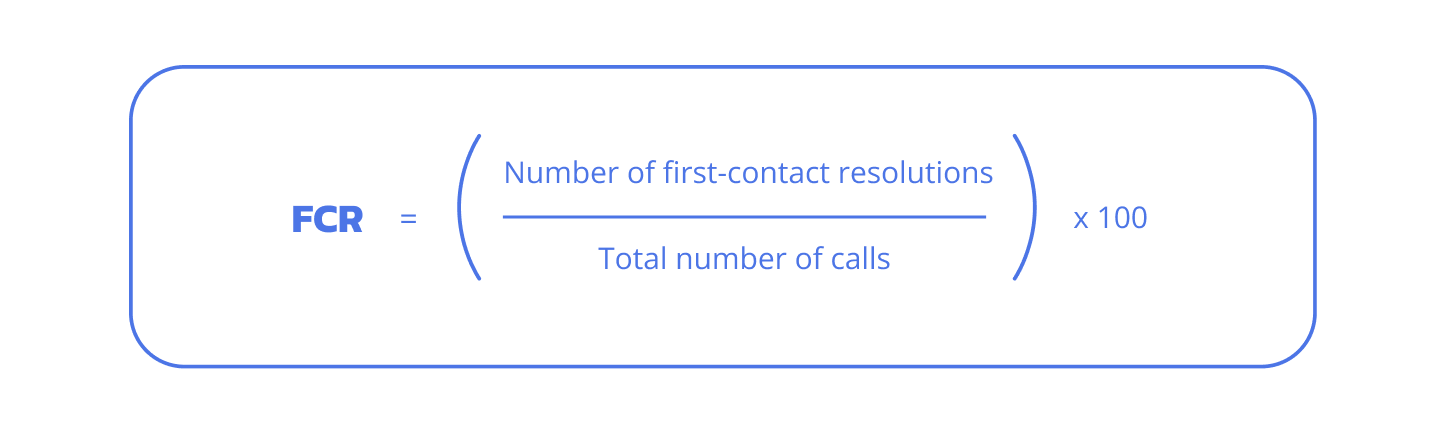
FCR measures the percentage of customer issues resolved in a single interaction. It’s a top driver of customer satisfaction and loyalty because callers hate repeating themselves, and it directly cuts repeat volume while adding star points to your agent’s confidence. It depends on your industry, but on average, aim for 70–75% as your benchmark.
- Definition: Percentage of issues resolved on first contact.
- How it helps: Empower agents, streamline access to knowledge, and target recurring issues.
- Pitfalls: Speed pressure causing premature transfers; ignoring complex issue types.
Customer satisfaction (CSAT)
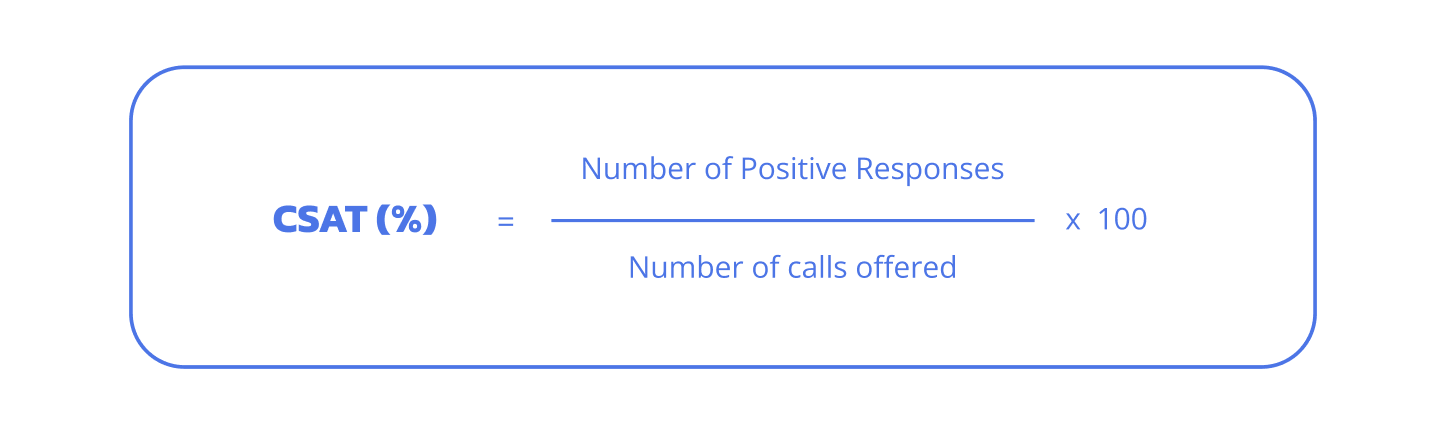
CSAT reflects how customers rate their experience via post-call surveys, typically on a 1–5 or 1–10 scale. They are typically collected right after interactions or via follow-up. It’s your direct pulse on service quality.
- Definition: Post-interaction customer satisfaction rating (1–5/1–10 scale).
- How it helps: Reduce transfers, improve knowledge bases, and make QA coaching stronger.
- Pitfalls: Low response rates skew data toward vocal minorities while ignoring qualitative comments.
Net promoter score (NPS)
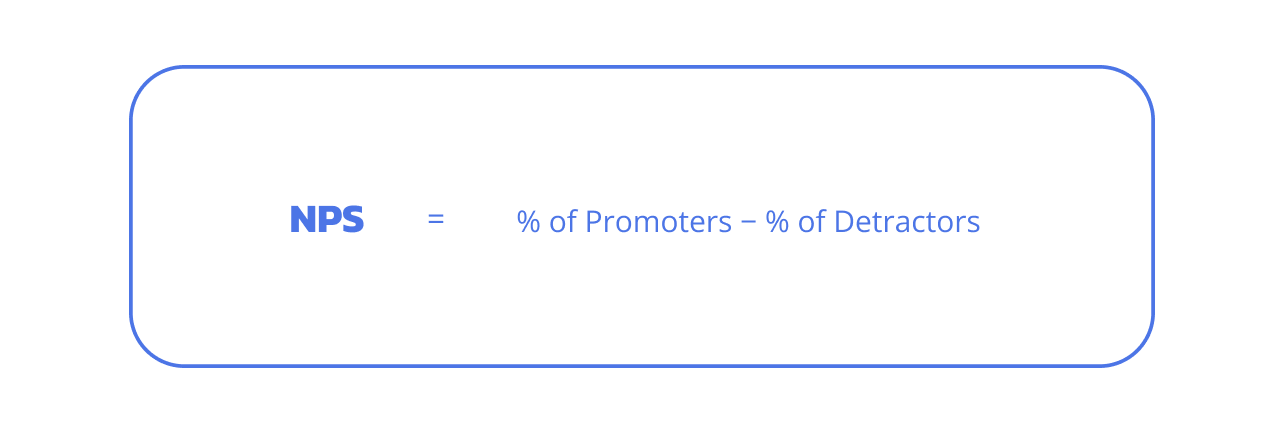
NPS asks customers, “How likely are you to recommend us?” on a 0–10 scale, classifying them as promoters (9–10), passives (7–8), or detractors (0–6), then subtracts detractors from promoters to yield a score from -100 to 100. It spots loyalty trends and revenue risks, since low scores often mean spotty experiences that turn people off.
- Definition: 0–10 likelihood to recommend, promoters minus detractors.
- How it helps: Amplifies what promoters love; fixes detractor frustrations.
- Pitfalls: Treating it like a one-off transaction grade rather than a loyalty signal; annoying people with too many surveys.
Customer effort score (CES)
CES asks customers, “How easy was it to resolve your issue?” on a 1–7 scale, zeroing in on interactions with little to no friction. Low-effort initiatives cultivate loyalty faster than flashy delights, like streamlining IVR.
- Definition: Customer-rated ease of issue resolution (1–7 scale).
- How it helps: Simplifies IVR, cuts handoffs, automates routine fixes.
- Pitfalls: Overlooking self-service effects; ignoring multi-channel journeys.
Service level and call accessibility KPIs
Service-level and call-accessibility KPIs, such as Average Speed of Answer, Queue Time, and Abandoned Calls, help keep queues healthy and ensure responsive service. Let’s look into some of them.
Service level
This one tracks the percentage of calls answered within a set time threshold, with the 80/20 standard (80% answered in 20 seconds) being the go-to benchmark for most call centers to keep queues healthy and responsive. Adapt it for your business by tweaking to 90/30 for complex queries or 70/20 during peaks, balancing speed with agent efficiency.
- Balances staffing to prevent overloads
- Signals quick access during busy periods
- Ties to lower abandonment and higher CSAT
Average speed of answer (ASA)
ASA measures the average wait time from call arrival to agent pickup, highlighting responsiveness. Industry benchmarks hover around 20–30 seconds, though they vary by sector, such as retail (20–30s) or healthcare (30–60s). Shorter ASA keeps queues fluid, cuts frustration, and boosts pickup rates; aim for 28 seconds below as a directional target while aligning with your handle time.
- Call center monitoring for peak hours to adjust staffing
- Post-IVR checks to smooth entry
- Ties directly to abandonment drops
Queue time
Queue time is the duration callers wait in line before reaching an agent or IVR prompt, directly fueling abandonment (over 5% spikes) and tanking CSAT as waits drag past 30 seconds. Healthy queues stay under 20–30 seconds via levers like staffing alignment to forecasts or smarter routing to skilled agents, ensuring steady flow without overloads.
- Track during surges for real-time alerts
- Relate to CSAT dips from long holds
- Fix with dynamic staffing or skills routing
Abandoned calls
Abandoned calls, the percentage of callers who hang up before connecting ((abandoned / total inbound) × 100), reveal queue stress. A good abandonment rate target is under 5% (top centers hit 3%), though some sources allow 5–10% depending on industry; spikes signal understaffing, long ASA, or poor IVR, prompting urgent staffing or callback fixes.
- Interpret spikes as responsiveness red flags
- Benchmark against 3–5% for health
- Use callbacks to recapture drop-offs
Agent performance KPIs for sustainable management
Keeping everything in balance is challenging, but quite possible. What is the right call center management approach that makes agents perform better while keeping them sane?
Adherence to schedule
Adherence to the schedule tracks how well agents stick to their shifts, including planned breaks, meetings, and training. It’s the percentage of scheduled time spent on core tasks like calls or coaching (aim for 85–90%). When agents drift off-plan, it ripples into questionable levels of service, longer queues, and frustrated customers, so keeping it tight ensures reliable coverage without burnout.
Occupancy
Occupancy shows the share of logged-in time agents spend handling calls or wrap-up. Too low (under 75%) means idle inefficiency and long customer waits, while too high (over 85%) stresses folks out, risking burnout and sloppy service. Sustainable call center management caps it around 80%, giving breathing room for quality without wasting payroll.
Call quality score
Call quality scores agent interactions based on empathy, accuracy, and resolution. Use it to guide training and growth, not as a stick; it builds better reps who keep customers happy in the long term.
After-call work
After-call work is the time agents need to take notes, provide updates, or make callbacks. Benchmarks run 1–2 minutes per call, varying by complexity. High ACW drags down efficiency and queues; automate CRM pop-ups or templates to reduce it, freeing agents for more live chats.
Call volume and forecasting KPIs
Of course, we can’t predict what will happen today or tomorrow, but we can forecast certain aspects of expected call volume. Based on KPIs, obviously.
Inbound and outbound call volume
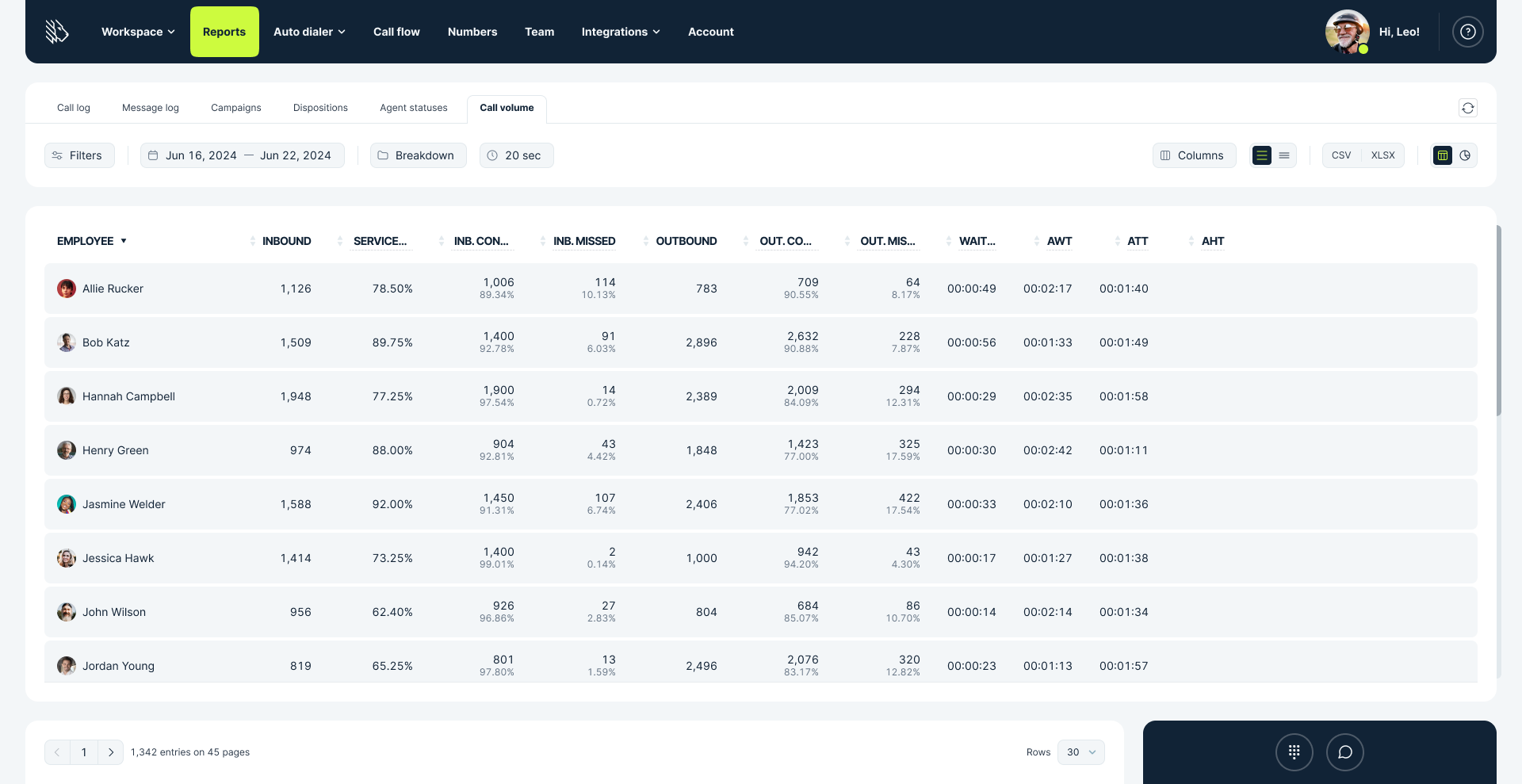
Call volume counts incoming customer calls and agents’ outbound calls over a day or week. It’s your basic pulse on activity. However, volume alone doesn’t cut it; you need it alongside staffing levels and channel mix (like chat vs. phone) to avoid understaffed chaos or idle agents. Tracking both outbound and inbound calling helps plan shifts and spot trends, such as sales campaigns spiking outbound calls.
Peak call hours
Peak call hours pinpoint the busiest times, like 2–4 PM, when, for example, everyone calls about bills. Use them to stack extra call center agents, or route calls more intelligently. This keeps wait times short and service smooth without overstaffing quiet slots.
Forecast accuracy
Forecast accuracy measures how close your predicted call volume lands to reality, usually as a percentage (like 90% means you nailed it within 10%). Wrong forecasts lead to either too few or too many staff, resulting in wasted pay. Getting it right ensures the right coverage for every shift.
Efficiency and cost KPIs without harming CX
Efficiency and cost KPIs keep operations lean, without sacrificing the customer service experience that drives loyalty. Combine them with satisfaction metrics to strike the right balance.
Average handle time (AHT)
AHT is calculated by adding talk time, holds, and paperwork time after each call, then dividing by the number of calls handled. It’s about getting things done fast without rushing customers out the door. Chase it too hard, and service suffers. Pair with CSAT to maintain high quality. Benchmarks sit around 6 minutes across industries, though tech support runs longer.
Average call duration
Average call duration tracks only talk time (plus any holds), skipping the paperwork that AHT includes. It’s your cue if conversations stretch from small talk to big problem-solving. Shorter isn’t always smarter; team it up with FCR to make sure fast calls fix issues for real, not just kick the can down the road with annoying follow-ups.
Cost per contact
Cost per contact adds up all your call center expenses, like salaries, tech, and rent, then divides by the number of customer interactions. Ops directors track it to spot cash leaks, especially in tight budgets. You can trim it with smoother processes, shifting people to self-service, smarter call routing, or better training.
Why most call center reporting fails
If your dashboard looks impressive but nothing changes, you’re not alone. Most call center reporting and analytics fail because they drown teams in KPI overload, throwing every metric at the wall without focus. Passive dashboards sit there blinking pretty numbers, but no one digs in or owns the fixes.
Inconsistent definitions mean one team’s “service level” is another’s wild guess, and worst of all, it’s all “metrics without actions”. Endless tracking with zero plans to tweak staffing or training. That becomes exhausting really fast.
You know the saying, “you can’t improve what you can’t measure”? It’s true, but there’s more to it. You can’t improve what you don’t act on. Smart reporting turns data into decisions, like spotting peak-hour chaos and adding coverage before customers run for the hills.
All in all, what do we have?
- KPI overload: Too many metrics to track paralyze rather than guide. Pick 5-7 that matter.
- Passive dashboards: Static views miss trends.
- Unclear ownership: If no one is accountable, then numbers remain ignored.
- Inconsistent definitions: Vague terms lead to poor comparisons.
- Metrics without actions: Raw data is worthless without specific plans.
The reporting structure that drives action
Build a reporting framework you can actually use and implement. Do not romanticize KPIs, thinking they’re your only key to creating the perfect call center operations. Structure everything before diving headlong.
Start with business and customer outcomes
Tie every report to real goals, such as happier customers or lower costs. Instead of drowning in data, map outcomes to KPIs and actions that move the needle. This keeps everyone laser-focused on what matters.
| Outcome | Key KPIs | Sample actions |
|---|---|---|
| Improve CSAT | CSAT, FCR, ASA/queue time, transfers | Coach on first-call fixes; trim hold times with better routing |
| Reduce abandonment | Queue time, service level, staffing coverage | Add peak-hour call center agents; offer callbacks during surges |
| Lower cost per contact | AHT, ACW, repeat contacts | Automate notes; train to cut repeat calls |
Role-based call and contact center report views
Customize views to each role’s preferences. To be more specific, agents need personal nudges, managers watch live queues, ops plan capacity, and execs get big-picture stories. This cuts the noise and moves everyone in the direction.
| Role | What they decide | Key KPIs |
|---|---|---|
| Agent | Daily performance and growth | Personal AHT, FCR, QA score, coaching tips |
| Supervisor/Team Lead | Real-time coaching and shifts | Queue health, adherence, live QA signals |
| Operations/Management | Staffing and planning | Forecast accuracy, occupancy, SLA trends |
| Executive | Strategy and investments | CX trends, cost per contact, risk alerts (with narratives) |
Smart views empower decisions without overwhelm—agents improve, leaders act fast.
Choosing the right reporting cadence
Match reports to decision speed. For example, real-time for urgents and monthly for trends. Keep a consistent beat so the right info hits at the right time, powering quick daily fixes or thoughtful weekly chats.
- Real-time: Jump on queue backups or coach agents live (for supervisors).
- Daily: Agent self-checks and early staffing flags.
- Weekly: Team patterns and forecast adjustments (ops team).
- Monthly: Exec summaries and fresh goals.
Real-time call center reporting: when it helps and when it hurts
Real-time reporting is fantastic for quick fixes, like shifting staff in a moment of crisis, but it won’t work if you’re spying on agents. Use it for smart decisions, not Big Brother vibes.
High-impact real-time reporting use cases
Live data lets you spot surges and act fast, like rerouting calls or pulling in backups before customers hang up frustrated.
- Intraday staffing: Spot thin coverage? Bring in extra hands right away.
- Queue triage: Backed-up lines? Shift to available agents.
- SLA protection: Metrics slipping? Ping the supervisors.
- Emerging issues: Sudden wave of complaints? Jump in with coaching or fixes.
Common real-time reporting mistakes
Chasing every blip leads to knee-jerk chaos, like shuffling staff for nothing. Instead, set thresholds and 30-60-minute rolling averages to filter out noise and focus on real trends.
- Reacting to noise: One bad call isn’t a crisis. Analyze the call, see what went wrong, and move on.
- Micromanagement: Tracking individuals kills morale.
- Not normalizing by volume: Quiet days look “perfect.”
- Ignoring channel mix: Phone jams while chat idles.
Call center reporting for small business teams
A small business team doesn’t need data overload—with limited staff, no full-time analysts, and basic tools, focus on simple wins first, then scale up as you grow.
A minimal KPI set for small business call centers
Keep it to 6-8 must-haves that actually matter: service level and ASA for quick pickups, abandonment to catch drop-offs, FCR and CSAT for happier customers, etc. Review them weekly. You do not need a PhD or a dozen spreadsheets to adjust everything on the go; it’s not as complicated as we make it out to be in our heads.
Simple reporting tools and structure
Spreadsheets are a great starting point for small teams—they’re free, easy to update, and work well for sharing numbers in quick standups or Slack. They usually do the job until things get more complex: you add more channels (like chat and email), your team grows fast, or you need cleaner audit trails for compliance.
How MightyCall can help improve call center reporting
MightyCall helps you turn reporting from a chore into something your team can actually use every day. You will get clear visibility, consistent numbers, and faster decisions without spending hours in spreadsheets. Instead of piecing data together from different tools, you get clean views of the KPIs all in one place.
Here’s how MightyCall can support the reporting system you’ve designed:
- Call center dashboard: Live view of calls in queue, longest wait times, and missed calls so that supervisors can act in the moment.
- Call volume & performance reports: See inbound/outbound volume, service level, and handle time by hour, agent, or campaign.
- Call logs: Detailed history with filters, recordings, and exports for QA, audits, and coaching.
- Campaign & disposition reports: Track outbound results, connection rates, and outcomes in one view.
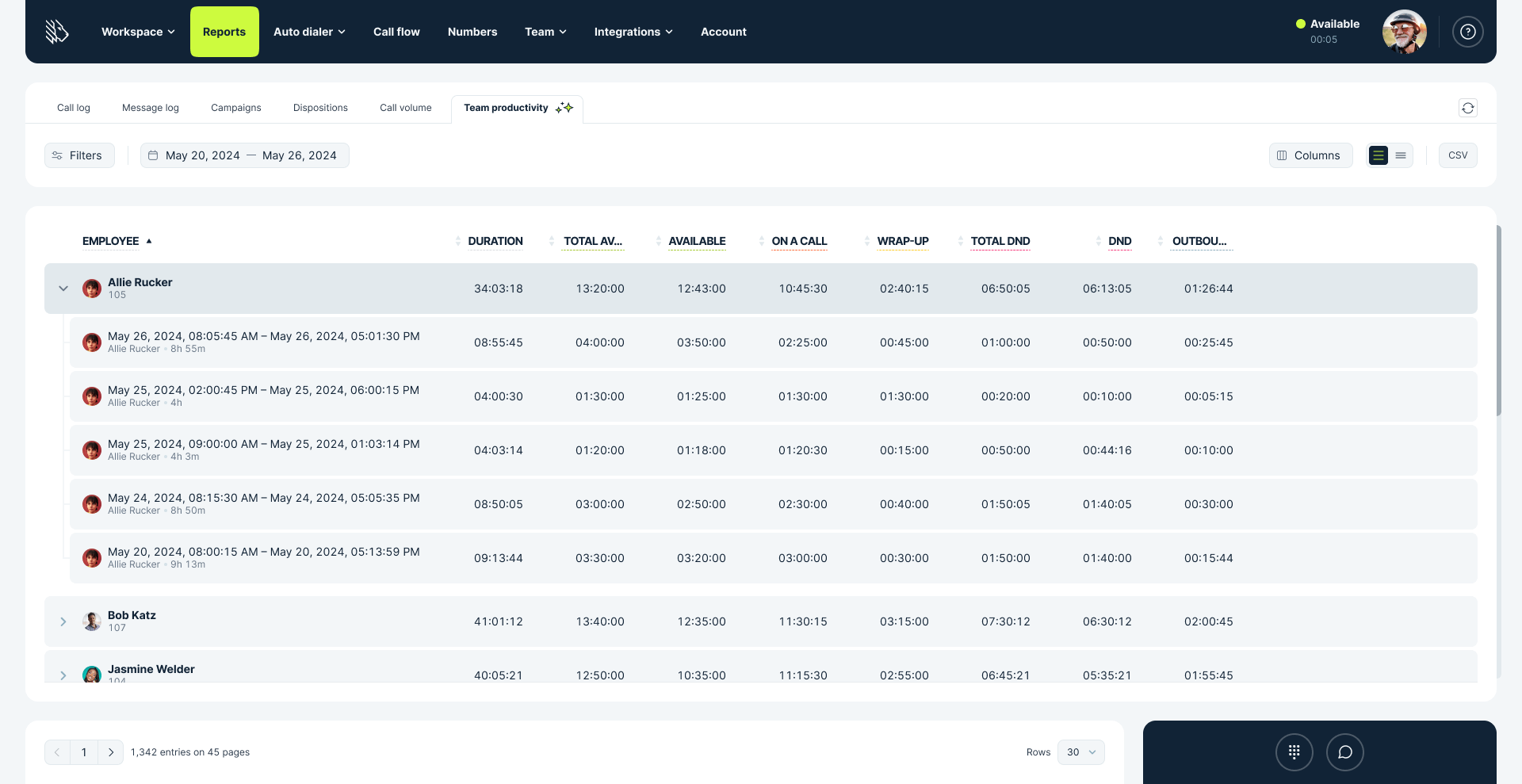
- Team productivity report: Understand how agents spend their time (on calls, wrap-up, DND) to keep workloads fair and focused.
If your goal is to spend less time on analyzing call center reports and more time actually improving outcomes, a quick demo or trial is an easy way to see if MightyCall fits your setup.
schedule your personalized demo with our amazing team

Best practice guidelines and tips for reliable call center reporting
Great reporting isn’t a data dump. It’s about ownership, trustworthy numbers, easy-to-scan views, and staying compliant so everyone trusts it and acts on it. Let’s go over these five simple tips to get you from point A to point B.
1. Define ownership and accountability
Give every KPI three jobs: a tracker (KPI owner), an actor (decision owner), and a fixer (escalation owner). Like ops tracking service level, supervisors shifting staff, and call center managers stepping in on missed opportunities.
Why does it matter? Well, it’s rather simple: if there are no owners, there will be a lot of finger-pointing, and metrics will simply collect dust. To avoid that fate, whip up a simple role chart and hash it out during your next meeting.
2. Establish data quality and reporting governance
Data quality and reporting governance means locking in basic checks, double-verifying key numbers, and using the same definitions everywhere.
Sloppy data leads to bad decisions, like hiring when you don’t need to or missing real demand spikes. You can get started quickly by adding a simple 5‑minute daily sanity check to your routine and standardizing your main reports with reusable templates.
3. Design reports for clarity and usability
Create reports for clarity by swapping dense tables for charts and graphs, using bold colors like red for red flags, and keeping everything to a one-page max so anyone can scan in seconds.
Overloaded reports just get ignored, so no real changes happen. Jump-start it by turning one key table into a bar chart and asking your least tech-savvy team member what they think.
4. Consider compliance and data protection
Compliance and data protection mean masking personal information, granting access only to those who need it, and logging activity to stay on top of certain regulations, such as GDPR, CCPA, and PCI.
One mistake can bring fines or chaos, so it’s smarter to build the safety gates upfront. Flip it on fast: set agents to read-only, auto-hide sensitive details, and track file downloads.
5. Avoid reporting overload
Reduce reporting overload by limiting dashboards to 5-8 key metrics and always group them to prevent people from playing with the numbers at customers’ expense. Too many metrics paralyze teams, while single ones tempt rushed, half-baked service. To fix it quickly, strip down to essentials and add protective pairings.
Call center report templates by use case
Grab these templates for your docs. They are short, easy, and breezy checklists focused on what sparks real decisions. Tweak them to fit your team.
Daily operations report
- Who it’s for: Supervisors and ops
- When: End of day or morning standup
- Key numbers: Service level (aim 80/20), ASA (under 30s), abandonment (below 5%), occupancy (75–85%), adherence (over 85%)
Notes:
- Queue check: Who’s waiting longest? Sort it.
- Staffing gaps: Grab extras or stretch shifts.
- SLA slip? Log why (volume spike, glitch).
- Roadblocks: Jot ’em (outage, sick calls).
- What we fixed: “Moved 10 calls; brought in 2 reps.”
Weekly management report
- Who it’s for: Call center software managers and leads
- When: Friday wrap-up
- Key numbers: FCR (over 75%), CSAT (above 85%), AHT (~6 min), QA score (80%+), adherence shifts
Notes:
- Patterns: Volume jumped 10% Wednesdays? Fix the forecast.
- Coaching needs: Empathy lags for 3 reps—book time.
- Main gripes: Billing at 40%—beef up self-help.
- QA takeaways: Too many holds; teach callbacks.
- Test run: Short IVR trial—check results next week.
Monthly executive report
- Who it’s for: Bosses and stakeholders
- When: First Friday
- Key numbers: CSAT/NPS (vs last month), cost per contact (under $5), AHT changes, abandonment, turnover (if you track it)
Notes:
- Results: CSAT +5%; NPS holding at 45.
- Savings: Costs dropped by 8% due to ACW tweaks.
- Watch outs: Forecasts missed 12%; 15% turnover.
- Next up: Hire 3; roll out help bot.
- Shoutout: FCR nailed 82% – props to the team!
Making call center reporting a management habit
Reporting doesn’t have to become the 12 Labors of Hercules. It’s much simpler than that. Turn reporting into a habit. Connect outcomes to KPIs, set clear cadences, assign owners, and focus on actions. It’s a straightforward call management system that delivers results.
Start small. Choose one template, track 6 key KPIs, and review them weekly. Adjust the strategy as you go, and you will soon see better staffing and happier customers. Pick a template today and build your first report tomorrow.