
Key takeaways
- Auto-dialer dials one number at a time as soon as an agent is available, maintaining a steady 1:1 call-to-agent ratio and ensuring a consistent, controlled call flow.
- Predictive dialer dials multiple numbers simultaneously using algorithms that predict agent availability, connecting agents only when a call is answered to maximize talk time and minimize idle time.
- Key difference: Auto-dialers prioritize a steady, manageable workflow, with one call per agent at a time. In contrast, predictive dialers use advanced algorithms to dial in bulk and aggressively reduce agent downtime.
- An auto-dialer is best for smaller or mid-sized teams that need a reliable, steady call flow with lower compliance risk. It is ideal for appointment confirmations, follow-ups, and payment reminders.
- A predictive dialer is best for large call centers running high-volume outbound campaigns, such as telemarketing, debt collection, or market research.
When you are managing a call center, whether it’s big or small, picking the right tool for making phone calls can make a big difference in your team’s success. Auto dialers and predictive dialers are two popular choices, but they are meant for different setups and situations. In this guide, we will help you understand how each type of dialer works and which types of businesses might benefit from using them.
Auto dialer vs. predictive dialer: Key differences
| Auto dialer | Predictive dialer | |
|---|---|---|
| Best for | Smaller- to mid-sized teams that need steady, controlled call flow. | Large call centers running high-volume outbound campaigns. |
| Dialing method | Dials one number at a time as each agent becomes available. | Dials multiple numbers simultaneously; connects agent only when someone answers. |
| Call ratio | 1:1 – one call per available agent. | Many:1 – multiple simultaneous calls per agent pool. |
| Connection experience | Agent is ready the moment the contact picks up. | Brief delay possible between answer and agent connection. |
| Compliance & risk | Lower risk; easier to manage under telemarketing regulations. | Higher risk; aggressive dialing requires careful abandonment rate monitoring. |
| Personalization | Easier. Agents have time to prepare before each call. | Harder. Fast-paced back-to-back connections limit pre-call context. |
What is an auto dialer?
An auto dialer, often referred to as a progressive dialer, is a software tool that automates the process of making phone calls. It systematically dials numbers from a contact list immediately after an agent finishes a call, ensuring a continuous flow of communication without manual intervention.
Types of auto dialers include:
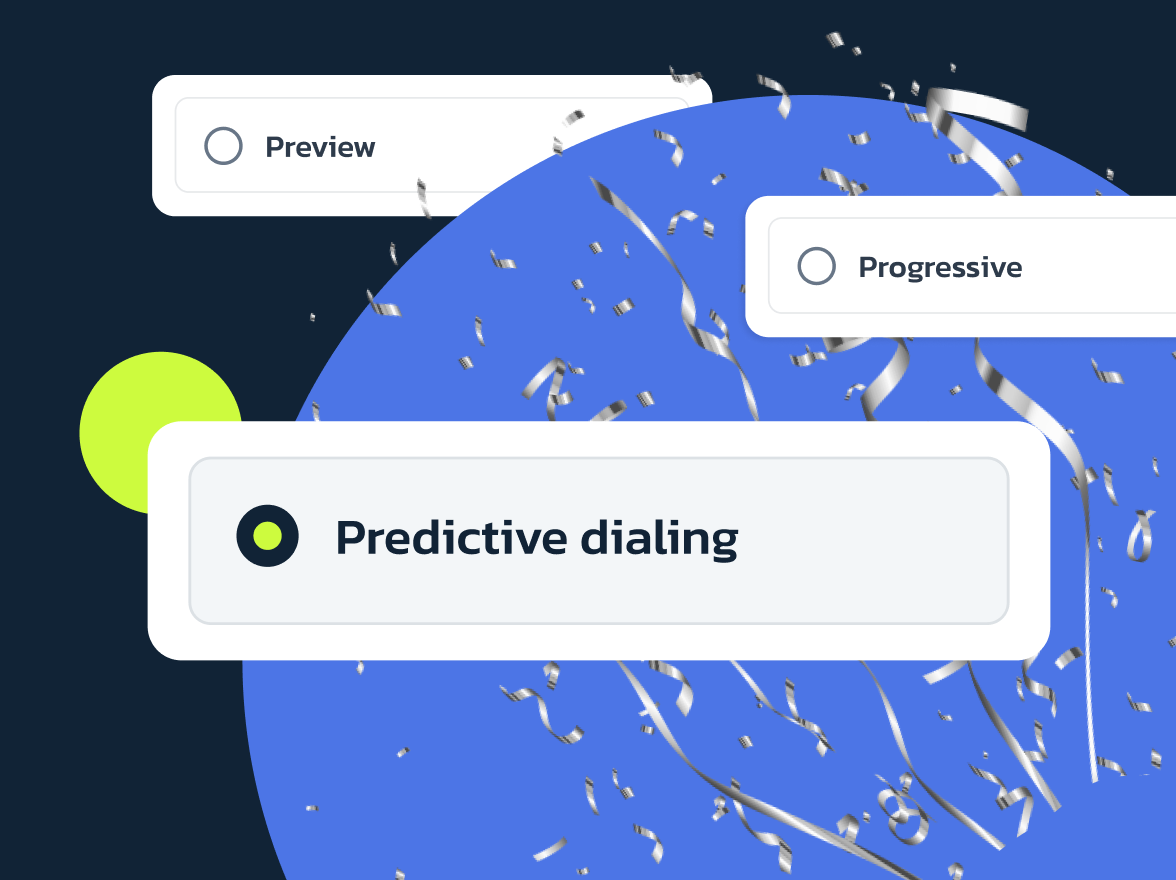
- Preview Dialer: Allows agents to see customer information before deciding to make the call, giving them time to prepare for personalized interactions.
- Progressive Dialer: Automatically dials the next number in line as soon as an agent becomes available, maintaining a steady call flow with minimal pause.
- Predictive Dialer: Uses algorithms to dial multiple numbers simultaneously, connecting agents only to answered calls, which optimizes call flow and reduces idle time.
How it works
An auto dialer automates the process of making phone calls in a call center, ensuring a consistent workflow. Here’s how it typically operates:
- Agent completes a call. The auto-dialer immediately queues the next contact, requiring no manual input.
- Wrap-up time kicks in. The agent gets a short window to finish after-call tasks: updating records, adding notes, or scheduling follow-ups.
- The next number is dialed. The system places the call the moment the agent is ready, maintaining a strict 1:1 call-to-agent ratio.
- No answer or voicemail? The dialer automatically skips to the next number on the list, keeping the queue moving without interrupting the agent’s flow.
Pros & Cons
Here’s a detailed comparison of the advantages and disadvantages of using an auto dialer in a call center environment:
| Advantages | Disadvantages |
|---|---|
| Increased handled calls per hour. Agents spend less time manually dialing and more time talking, improving hourly talk-time metrics for managers tracking AHT and occupancy. | Lower pre-call prep time for agents. Faster call pacing reduces time to review CRM notes; may reduce personalization unless managers adjust scripts, add quick-reference prompts, or increase wrap-up buffers. |
| Shorter agent idle windows. The dialer reduces gaps between calls; helps managers smooth shift scheduling and maintain target occupancy levels. | Potential for negative customer experience. Rapid calls may feel intrusive; train agents to de-escalate annoyed contacts and enforce frequency caps + sensible calling windows. |
| Predictable workflow for coaching. Consistent call pacing makes it easier to spot skill gaps, score calls, and run targeted coaching during planned wrap-up periods. | Compliance and abandonment risk. Aggressive dialing increases risk of abandonments; set abandon-rate thresholds (<3% target) and verify legal requirements by region. |
| Better contact-list throughput. Automated redialing and skip logic move low-value numbers faster, improving campaign penetration and prioritizing hot leads. | Higher onboarding and training needs. Agents need hands-on training in the dialer UI, disposition standards, and efficient after-call work to maintain high quality under pace. |
| Actionable reporting and quality flags. Call outcomes, dispositions, and wrap-up notes, when captured consistently, enable data-driven forecasting and performance-based incentives. | Script fatigue and reduced personalization. Repetitive high-volume calling can make scripts sound robotic; rotate prompts, use dynamic fields, and give agents pre-call cues. |
| Directly supports data quality processes. Clean lists and validation reduce wasted calls; operations must enforce list-cleaning and integrate validation tools. | Dependency on data quality. Poor list hygiene (incorrect numbers, duplicates) increases wasted calls and reduces campaign efficiency. |
What is a predictive dialer?
A predictive dialer is an advanced call dialing mode used in call centers to improve outbound campaigns. It automates the dialing process by calling multiple numbers simultaneously and only connecting an agent when a call is answered. This minimizes agent downtime by reducing the wait time between conversations and significantly increases the number of calls each agent can handle.
How it works
The predictive dialer is a call-processing system that improves call center productivity by dynamically managing call flows using algorithms. Here’s how it typically operates:
- Multiple calls are dialed simultaneously. The system starts by calling several contacts at once, creating a high volume of ongoing calls to maximize agent utilization.
- Algorithm predicts agent availability. Using campaign metrics (engagement levels, abandoned call counts), the dialer predicts when an agent will become free and adjusts dialing aggressiveness accordingly.
- Answered call connects to agent. When a contact picks up, the system immediately routes them to the next available agent, minimizing wait time for both parties.
- No answer or voicemail? The dialer automatically skips to the next number on the list, keeping the queue moving without interrupting the agent’s flow.
- Abandonment rate is monitored. If a call is answered but no agent is available yet, it counts as an abandonment; It is generally recommended to keep this rate under 3% to stay compliant with regulations.
Pros & Cons
Here’s a detailed comparison of the advantages and disadvantages of using a predictive dialer in a call center environment:
| Advantages | Disadvantages |
|---|---|
| Higher calls-per-hour throughput. Agents connect only to answered calls, which can 2–3x the number of live conversations per hour compared to manual dialing; managers see direct gains in talk-time metrics. | Lower pre-call prep time. Rapid back-to-back connections leave little time to review CRM notes; consider adding 5–10 second pre-call buffers or quick-reference prompts to preserve quality. |
| Minimized idle time between calls. The system queues calls so agents stay engaged; it helps managers hit target occupancy rates and reduce shift gaps without overstaffing. | Abandonment risk requires tight controls. If a call is answered but no agent is available, it counts as an abandonment. Set a threshold (e.g., <3%) and monitor dialing aggressiveness (lines per agent) to ensure regulatory compliance. |
| Dynamic dialing adjusts to campaign performance. Algorithms use engagement levels and abandonment data to scale calls per agent; managers can tune lines-per-agent (1–10) based on real results, not guesses. | Complex initial setup and calibration. Requires careful configuration of campaign goals, abandonment thresholds, and call-per-agent settings; dedicate time to A/B test dialing aggressiveness before full rollout. |
| Scales efficiently for large outbound campaigns. Handles high-volume telemarketing, debt collection, or market research without adding agents; ideal for expanding operations or seasonal spikes. | Less suitable for personalized or complex calls. Fast pacing limits context review; for high-value leads or sensitive topics, use auto/progressive mode or inject pre-call CRM summaries. |
| Actionable analytics for strategy optimization. Disposition codes, answer rates, and abandonment rates inform forecasting and performance incentives; managers can segment lists and refine scripts based on these data. | Dependency on algorithm calibration. Poorly tuned models can over-dial (high abandonment) or under-dial (low throughput); schedule weekly reviews of key metrics and adjust settings iteratively. |
| Cost-efficient per conversation. More live calls per agent-hour reduce cost per sale/lead; operations can justify ROI even with higher software costs. | Potential for customer annoyance at high volumes. Rapid calls may feel intrusive; enforce frequency caps, respect calling windows, and train agents on de-escalation tactics for annoyed contacts. |
Predictive vs. auto dialer: Comparison overview
Choosing the right dialer can make or break your outbound campaign. Predictive dialers and auto dialers both aim to streamline calling, but they work in very different ways and shine in different scenarios. Think of it this way: if your team is small and you value high-quality conversations, an auto-dialer is probably your best bet. If you’re running a high-volume sales or collections campaign with a large team, a predictive dialer will squeeze more conversations out of every hour.
Best for
Predictive dialer: Ideal for large call centers handling high-volume outbound campaigns like telemarketing, debt collection, or market research. It’s the go-to when you need to maximize the number of live conversations per agent and your priority is speed over personalization.
Auto-dialer: Perfect for small- to mid-sized teams that want a steady, predictable call flow without the compliance headache. It works well for appointment confirmations, payment reminders, follow-ups, and any campaign where a more personal touch matters.
Dialing method
Predictive dialer: Uses smart algorithms to dial multiple numbers at once, sometimes 2 to 10 calls per agent pool. The system connects an agent only when a contact actually answers, which dramatically reduces idle time and keeps agents talking.
Auto-dialer: Dials one contact at a time and immediately routes the call to the next available agent. It’s a straightforward 1-to-1 process that keeps things moving steadily, though you might see a few seconds of downtime if calls don’t line up perfectly with agent availability.
Call ratio
Predictive dialer: Operates at a many-to-one ratio; multiple calls are in progress for every agent in the pool. This is how it achieves high throughput, but it also means some calls will be abandoned if no agent is free when someone answers.
Auto dialer: Sticks to a strict 1:1 ratio, one call per available agent. There’s no queue of waiting calls, so each agent gets exactly one call at a time, making the workflow easier to manage and predict.
Connection experience
Predictive dialer: There can be a brief delay between when a contact answers and when an agent is actually connected. The system is juggling multiple calls at once, so sometimes it takes a second to route the answer to the right person. For most contacts, this delay is negligible, but it’s there.
Auto dialer: The agent is ready the moment the contact picks up. Since the system only dials when an agent is free, there’s no routing delay and no waiting. The conversation starts almost immediately, which can make the interaction feel more natural.
Compliance and risk
Predictive dialer: Can run into regulatory issues if it’s dialed too aggressively. Strict telemarketing laws (like the TCPA in the US) limit how many abandoned calls you can make, and predictive dialers can accidentally exceed those limits if you don’t monitor abandonment rates carefully. Most vendors recommend keeping abandonment rates under 3%.
Auto dialer: Much lower compliance risk. Since it only dials one call per agent and doesn’t create abandoned calls, it’s easier to stay within legal boundaries. This makes it a safer choice for businesses in regulated industries or regions with strict calling rules.
Personalization
Predictive dialer: Harder to personalize. Agents are racing from one call to the next with minimal prep time, so there’s less opportunity to review CRM notes or tailor the conversation. This works great for transactional calls but can feel robotic for high-value leads or sensitive topics.
Auto dialer: Easier to personalize. The steady pace gives agents a few seconds to review customer data before the call starts, helping them sound more informed and build rapport. This is why auto dialers are better for campaigns where trust and relationship-building matter.
When to use an auto-dialer?
An auto-dialer is the right choice when you need a steady, controlled call flow without the complexity of aggressive dialing. It works well for teams that value consistency, compliance, and a more personal approach to each conversation.
Use an auto-dialer for:
- Appointment confirmations and reminders. Patients, clients, or customers expect a friendly, timely call to confirm their slot. The 1:1 ratio gives agents time to review notes and handle questions calmly.
- Payment reminders and billing follow-ups. These calls require a measured tone and the ability to discuss details. Auto-dialers maintain a steady pace so agents can build rapport and resolve issues.
- Customer satisfaction surveys. When you’re asking for feedback, quality matters over quantity. Agents can listen carefully and capture nuanced responses without rushing to the next call.
- Follow-ups after purchases or service visits. Post-call follow-ups are relationship-building opportunities. The predictable flow lets agents personalize the conversation and address specific concerns.
- Non-emergency support notifications. Things like service updates, delivery notifications, or policy changes call for clear, calm communication. Auto dialers ensure agents aren’t overwhelmed and can explain details properly.
- Small to mid-sized teams. If you have 5–25 agents, an auto-dialer provides the automation you need without overcomplicating workflows or risking compliance issues.
When to use a predictive dialer?
A predictive dialer is built for high-volume outbound campaigns where speed and efficiency are the top priorities. It uses algorithms to dial multiple numbers simultaneously and connects agents only when someone answers, minimizing idle time and maximizing the number of live conversations per hour.
Use a predictive dialer for:
- Telemarketing and cold sales campaigns. When you’re working through large lead lists and need to book as many demos or sales as possible, predictive dialers let agents fly through the list and connect with interested contacts faster.
- Debt collection. Collectors need to reach as many borrowers as possible in a short window. Predictive dialers reduce downtime and help teams meet daily call targets without adding more agents.
- Market research and polling. These campaigns rely on volume to get statistically significant results. Predictive dialers help you reach thousands of contacts quickly and efficiently filter out non-responders.
- Large call centers (25+ agents). When you have a big team managing outbound work, predictive dialers scale effortlessly. The system handles the complexity of dialing multiple calls per agent pool, so managers don’t need to micromanage workflows.
- Seasonal spikes or short-term campaigns. If you’re running a limited-time promotion or need to clear a backlog of calls quickly, predictive dialers let you ramp up volume without hiring more staff.
- Campaigns where answer rate is low. When only 10–20% of calls get answered, predictive dialers compensate by dialing more numbers simultaneously, ensuring agents stay busy even when most calls go unanswered.
How MightyCall can help
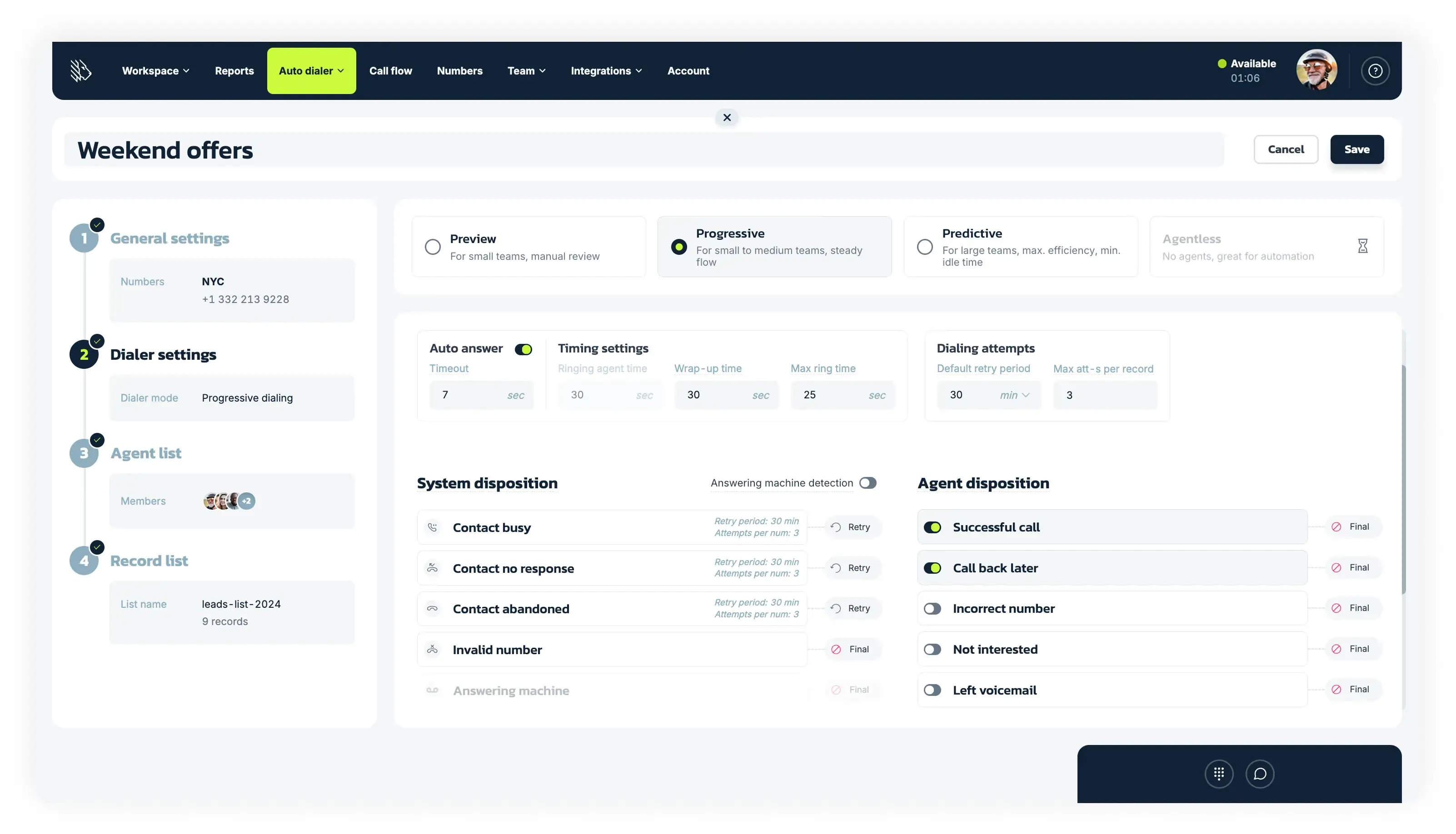
MightyCall offers both auto (progressive) and predictive dialers built for real call center workflows, so you can pick the right tool for your campaign type and team size.
MightyCall’s progressive dialer maintains a strict 1:1 call-to-agent ratio, giving you a steady, compliance-safe flow that’s perfect for appointment confirmations, payment reminders, and follow-ups. Agents get a brief wrap-up window after each call, and the system automatically moves to the next contact when they’re ready.
A predictive dialer uses smart algorithms to dial multiple numbers simultaneously (1–10 lines per agent) and connects agents only when someone answers. It’s designed to minimize downtime and boost talk time, making it ideal for high-volume sales, debt collection, or market research campaigns. You can set it to Auto mode for optimization or manually tune calls-per-agent based on your answer rates.
Both dialers include built-in compliance safeguards, real-time analytics, and disposition tracking to help you monitor abandonment rates, optimize campaigns, and stay within legal limits (we recommend keeping abandonment rates under 3%). Whether you need control or speed, MightyCall’s dialers adapt to your workflow.
schedule your personalized demo with our amazing team

Auto dialer or predictive dialer: How to choose?
Picking the right dialer isn’t about guessing; it’s about matching the tool to your campaign goals, team size, and compliance needs. We put together this step-by-step checklist, so you can make the right choice.
1. Analyze your daily call volume
Count how many outbound calls your team makes per day. If you’re handling 500+ calls and need to maximize live conversations, choose a predictive dialer. If you’re making 50–300 calls per day and want a steady, predictable flow, an auto-dialer is a better fit.
2. Evaluate your team size and operational scale
Look at how many agents you have. If you’re running a large call center with 25+ agents and need to scale during seasonal spikes, go with predictive. If you’re a small- to mid-sized team (5–25 agents) that values simplicity and control, an auto-dialer will meet your needs without overcomplicating things.
3. Check your compliance requirements
Review the telecommunications regulations in your region (such as the TCPA in the US). If you’re in a heavily regulated industry or worried about abandoned calls, choose an auto-dialer; it’s safer and easier to manage. If you’re confident you can monitor abandonment rates (keep them under 3%) and have the resources to stay compliant, a predictive dialer works.
4. Decide how much personalization each call needs
Think about your campaign type. If you’re handling appointment confirmations, payment reminders, or follow-ups where building rapport matters, choose an auto-dialer. Agents get time to prep before each call. If you’re running telemarketing, debt collection, or market research where speed and volume matter more than personalization, go with predictive.
5. Test both modes if you’re unsure
MightyCall lets you switch between auto and predictive modes. Start with Auto mode to let the system optimize dialing, then monitor your answer rates and abandonment metrics. If you’re under the 3% abandonment threshold and want more throughput, incrementally increase calls-per-agent (1–10 lines) to test predictive performance.
Auto dialer or predictive dialer: Which is best for your business?
The truth is – neither dialer is universally better. The right choice depends entirely on what your team is trying to accomplish.
If your priorities are quality, compliance, and a steady workflow, go with the auto-dialer. It’s predictable, lower-risk, and gives agents the breathing room they need to handle each conversation well. It’s especially valuable for teams running follow-up campaigns, appointment reminders, or any call type where the relationship matters as much as the volume.
If your priority is speed, scale, and maximum throughput, the predictive dialer is the stronger tool. It’s built for large outbound teams that need to move through long contact lists efficiently, hit daily call targets, and squeeze more live conversations out of every agent hour.
In practice, many call centers use both — switching between modes depending on the campaign. MightyCall supports this flexibility, letting you run auto and predictive campaigns side by side, monitor abandonment rates in real time, and adjust dialing aggressiveness as your results come in. You’ll know within a few hours which one fits your team’s rhythm.