
In today’s world, data is the secret sriracha sauce that powers top-performing contact centers. With customers expecting quicker, smoother, and more personalized service, keeping an eye on important call center KPIs is no longer optional—it’s critical. These numbers don’t just crunch calls; they unlock insights into the performance, client happiness, and overall efficiency, letting contact center managers turn everyday interactions into memorable experiences.
Key takeaways
- Call center KPIs are your best friends for measuring agent effectiveness, customer satisfaction, and operational smoothness.
- The best contact centers have First Call Resolution rates above 70% and Customer Satisfaction Scores over 85%.
- Group your KPIs into easy buckets: Call center agent performance, customer happiness, operations, and big-picture business metrics.
- Not every number is a KPI; only those tied to real business goals make the cut.
- Dashboards and real-time monitoring tools make tracking these KPIs a breeze for managers on the go.
- Top centers keep abandonment rates low (under 5%) and answer calls fast (ASA under 20 seconds).
What is a call center KPI?
A call center KPI (Key Performance Indicator) is a clear, measurable number that shows how well your call center is doing—whether that’s solving client problems on the first call, speeding up response times, or keeping agent productivity at a maximum level. Think of it as a trusty compass for success.
These KPIs tie directly to customer satisfaction and smooth operations, helping managers see what’s working and where to level up. And yes, agents get scored, too. It’s all about giving the spotlight to the stars and lifting the team as a whole.
| Type | Examples | What it tracks |
|---|---|---|
| Inbound | ASA, FCR, AHT, CSAT | Speed to answer, solve on first call, length of calls, and customer call feedback |
| Outbound | Contact rate, conversion rate, average call length | How many calls do agents make, sales success, and call efficiency |
KPI vs metric: What’s the difference?
A KPI is a special kind of metric that focuses on your company’s major goals. Metrics are any numbers you can track, like total calls or average handle time. But KPIs zero in on what really matters, guiding decisions that boost performance. Simply put: All KPIs are metrics, but not all metrics wear the KPI badge.
This difference matters for making smart choices. Simple metrics might show high call volume, but as a KPI, it counts only if it helps meet performance goals, such as maintaining service levels during peak hours. Tools like a MightyCall dashboard can help separate the two, showing which numbers drive real progress. Let’s look at practical examples.
Examples
| KPI | Examples | What it tracks |
|---|---|---|
| CSAT | Total Calls | CSAT shows how happy customers are; Total Calls just counts the volume without context |
| First Call Resolution | Transfer Rate | FCR measures success in solving issues right away; Transfer Rate shows how often calls get bounced around |
Comprehensive list of core KPIs for call centers
Let’s try to paint the big picture. Call center KPIs break down into four mighty categories: based on their focus: agent, customer, operations, and strategic. Some numbers stay just numbers for one center but turn into KPIs for another, depending on what you want to achieve. However, the following metrics will always be KPIs everyone should watch: FCR, CSAT, NPS, SLA, and cost per contact. Basically, your categories go like this:
- Agent performance KPIs: How well your frontline heroes do.
- Client-focused KPIs: What’s the customer feedback, how they feel, and how long they stick around?
- Operational efficiency KPIs: How smooth and cost-effective your workflows are.
- Business and strategic KPIs:The big money and leadership metrics.
Agent performance KPI: Monitor frontline excellence
These KPIs shine a spotlight on your agents’ day-to-day brilliance, helping reduce escalations, boost coaching, and keep the entire contact center humming smoothly.
- Average Handle Time
- First Call Resolution
- Adherence to schedule
- Agent Satisfaction Score
- Agent occupancy rate
Average Handle Time (AHT)
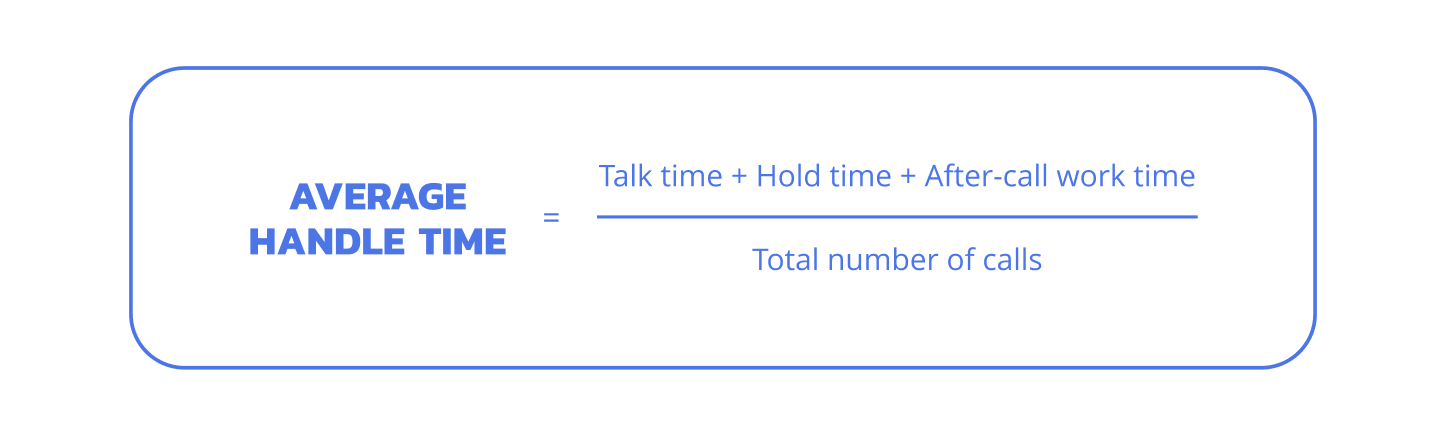
AHT is the average time an agent spends handling a call, including chat, hold music, and post-call paperwork. Think of it as how long a customer’s journey takes from hello to goodbye, calculated as (talk time + hold time + after-call work) divided by total calls. Aim for 4-6 minutes, but remember, a super speedy call isn’t always a happy call. Shorter calls sometimes mean rushed clients. Balance is key!
First Call Resolution (FCR)
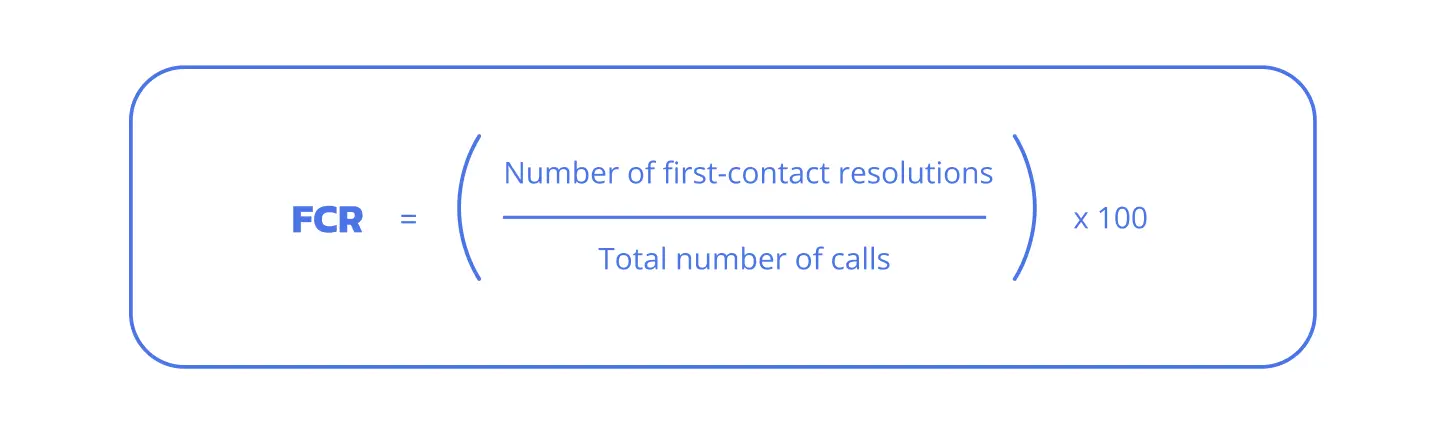
FCR tracks the percentage of calls solved on the very first go. Formula: (resolved on first call / total calls) × 100. Shooting for 70-75% here means fewer repeat contacts and happier customers. A high FCR is a win-win, as it reduces customer hassle and increases overall satisfaction.
Adherence to schedule
Adherence is all about agents showing up on time and sticking to their shifts. Calculate as (actual logged time / scheduled time) × 100; target 85-92%. Keeping this tight means maintaining steady operations through effective workforce management.
Agent Satisfaction Score (ESAT)
ESAT captures how your team feels about their work environment and the support they receive. Gather info through surveys, aim for 4.0 or higher on a 5-point scale. Happy call center agents = happy customers.
Agent occupancy rate
The occupancy rate measures how busy agents are during their logged-in time. Formula: (time spent on calls / total login time) × 100; sweet spot is 75-85%. Too high a score is a risk of burnout; a low one means wasted potential.
Customer-focused KPI: Improve satisfaction and retention
These numbers let you peek into the KPIs for customers. Seeing how they feel, how loyal they are, and whether they’re ready to stick with you. Let’s have a closer look at each KPI.
- Customer Satisfaction Score
- Net Promoter Score
- Customer Effort Score
- Customer churn rate
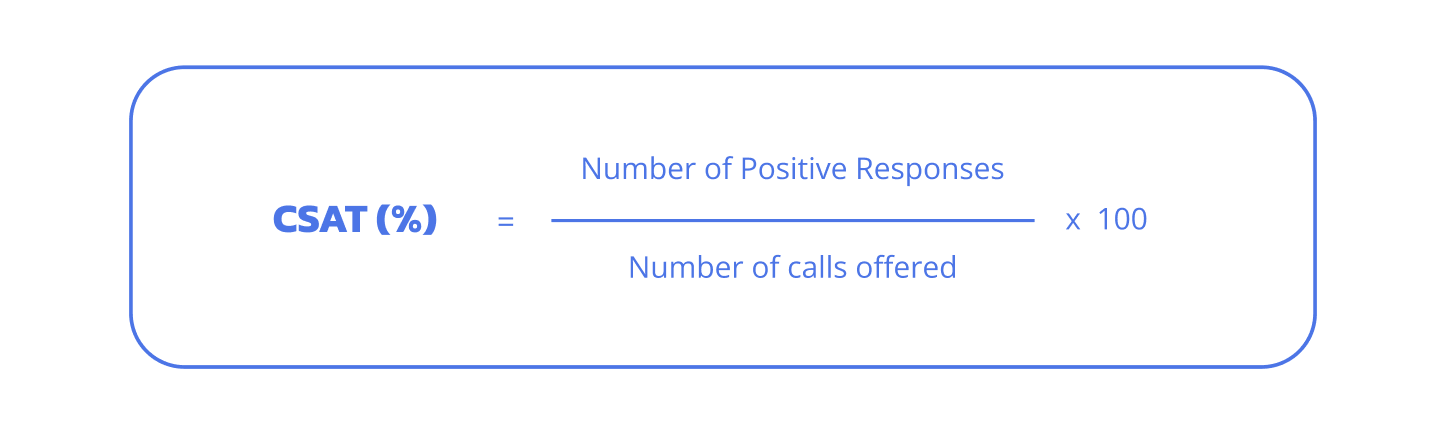
Customer Satisfaction Score (CSAT)
CSAT in call centers is a simple thumbs-up or down from your customers after a call. Often collected via quick surveys, an 80-90% satisfaction score means you’re winning. High scores mean your team’s doing a great job with customers, and loyal customers typically stick around longer.
Net Promoter Score (NPS)
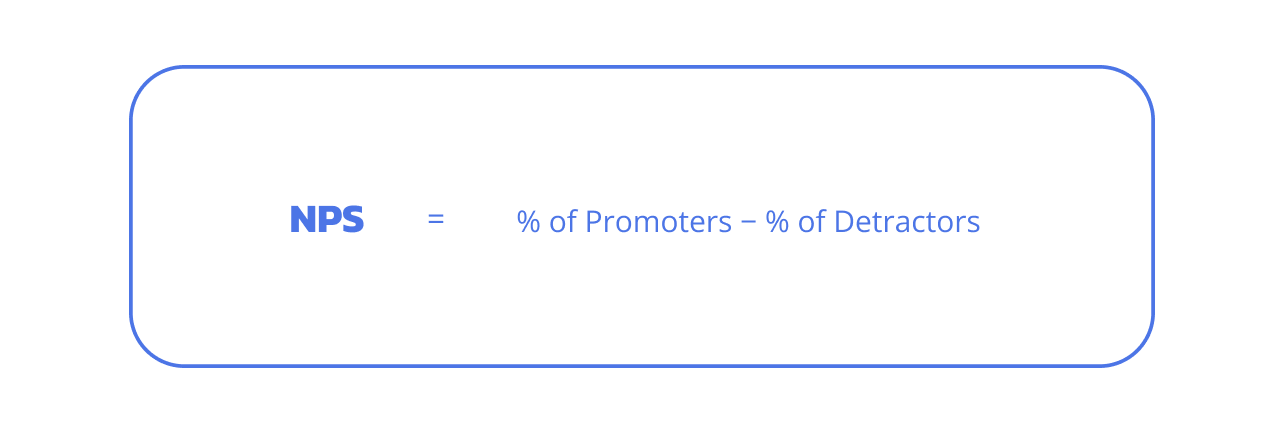
NPS asks how likely customers are to recommend you on a 0-10 scale. A 40+ score is a solid win. This metric impacts performance by highlighting strengths in customer service and areas for growth, such as improving service calls to build better brand trust.
Customer Effort Score (CES)
CES measures how easy it was for customers to have their problems solved. A lower effort score means happier and more loyal customers. CRM integration helps track this easily.
Customer churn rate
Churn rate counts how many customers leave over time. Keeping it low is crucial as every lost customer is lost revenue.
Operational efficiency KPI: Improve speed and reduce costs
Operational efficiency KPIs reflect how well a contact center manages volume, minimizes delays, and controls expenses.
- Average Speed of Answer
- Call abandonment and blocked calls
- Service Level Agreement
- Call Transfer Rate
- Average Wait Time
Average Speed of Answer (ASA)
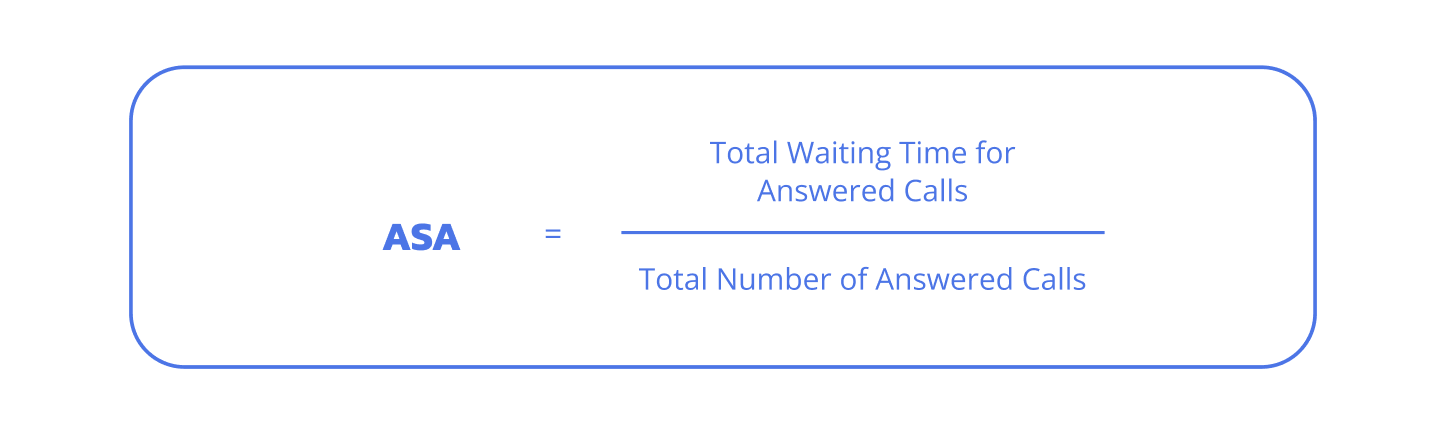
ASA tracks the average time customers wait before an agent picks up. The best aim would be under 20 seconds. Long waits equal frustrated customers. Quick answers make all the difference.
Call abandonment and blocked call rates
Track calls dropped in line and those blocked by busy signals. Best to keep both under 5%. High rates mean you need better call center agent allocation or routing.
Service Level Agreement (SLA)
SLA defines the expected response time or resolution standards in a contact center. Often measured as a percentage of calls answered within a time threshold, like 80% in 20 seconds. Benchmarks depend on contracts, but are commonly 80/20.
Call Transfer Rate
How often do calls get passed to someone else? Less is more, and lower transfers usually mean better agent expertise and happier customers.
Average Wait Time
The metric indicates the duration customers spend in the call queue before connecting. Calculated as total wait time / total calls. Target under 30 seconds. This metric matters for keeping customers engaged. Good workforce management and system setups help control it in contact centers.
Business and strategic KPI: Drive outcomes
Business and strategic KPIs appeal to leaders by focusing on costs, productivity, and results. They use center analytics to align customer experience with company goals, supported by tools such as voice analytics and omnichannel support. In this section, we will look into:
- Cost per contact
- Conversion rate (for hybrid/sales teams)
- Occupancy rate
Cost per contact
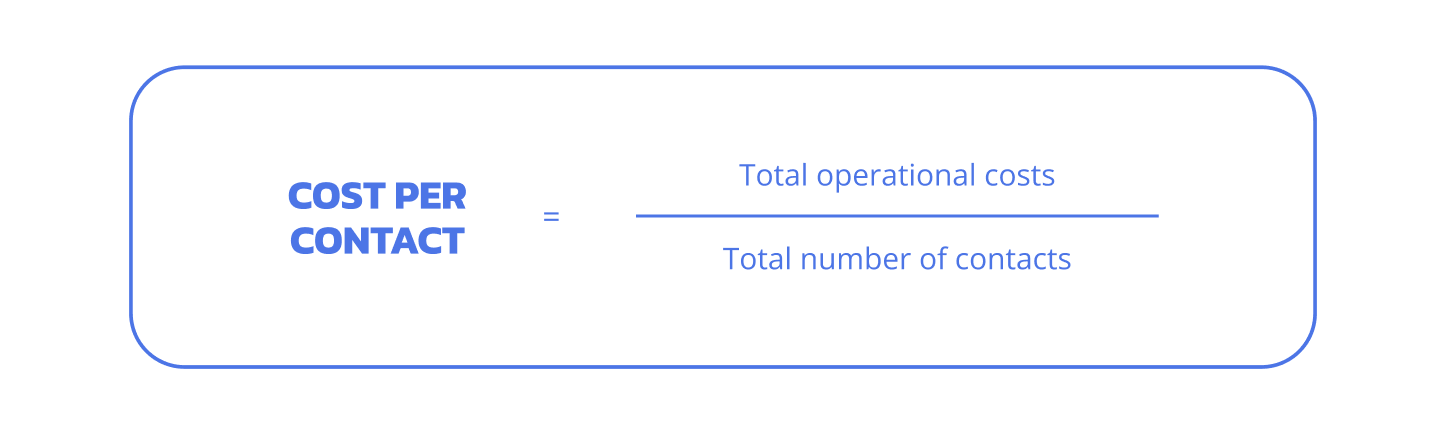
Divide all contact center costs by the number of calls answered. Keeping this number low is gold for executives looking at ROI.
Conversion rate (for hybrid/sales teams)
Conversion rate is the percentage of contacts that result in a sale or desired action. Calculate as (successful conversions / total contacts) x 100; aim for 20-30% in sales-focused teams. In contact centers, it shows campaign strength and agent skills, with CRM tracking aiding coaching for better performance and support.
Occupancy rate
Occupancy rate measures how much of an agent’s shift is spent on productive tasks. Formula: (work time / total shift time) x 100. The ideal is 75-85%. Call center key performance indicators like this balance productivity against burnout, linking to lower agent turnover and stronger overall results.
Why KPIs matter in call centers
Contact centers that track KPIs can reduce customer churn. These indicators are essential for decision-making, improving the customer experience, and keeping agents motivated. Without them, it’s like driving without a map. You might get somewhere, but not right away, and probably after having a meltdown because you missed your exit.
Benefits include:
- Clear direction for strategies, helping align daily work with long-term goals.
- Accountability for agents, turning data into personal growth opportunities.
- Cost savings – spend smarter, not harder.
- Better support through insights into customer interactions.
Picture a contact center ignoring high abandonment rates: customers hang up in frustration, resulting in lost business. However, with KPIs, managers adjust the staff quickly, turning potential losses into wins.
How MightyCall can help
- Dashboards for real-time insights: MightyCall’s platform displays live metrics such as ASA and FCR, enabling managers to spot trends and act quickly to improve performance.
- Agent reports: Track individual and team stats with detailed breakdowns, helping with coaching and boosting customer service quality.
- Contact center reporting: Get comprehensive views of KPIs, from occupancy to CSAT, all in one place for easy analysis.
- Integrations for smoother workflows: Connect with CRM tools to manage contacts more effectively, reducing AHT and enhancing support.
- Alerts and notifications: Stay on top of thresholds, like SLA breaches, to maintain high standards without constant manual checks.
schedule your personalized demo with our amazing team

How to choose KPIs for your call center
Picking the right KPIs starts with your contact center’s main goals, whether it’s sales growth or support excellence. Avoid chasing every number. Focus on those that are easy to track and tie to real results. For key indicators, consider your setup: inbound teams might prioritize speed, while outbound teams focus on conversions.
Use this checklist:
- What’s your primary goal? Retention? Then track churn and customer satisfaction score.
- Inbound or outbound focus? Inbound needs ASA and FCR; outbound wants contact rates.
- Do you prioritize cost control or customer happiness? Costs mean watching occupancy; happiness calls for NPS.
Recommendation sets:
- For CSAT gains: FCR, CES, ASA.
- For cost cuts: Cost per contact, occupancy rate, AHT.
- For sales: Conversion rate, contact rate, average call value.
- For agent focus: ESAT, adherence, turnover rate.
How to monitor and report call center KPIs effectively
Effective monitoring means regular checks and clear reports that everyone understands. Best practices involve choosing tools that fit your needs and setting a rhythm for reviews, like weekly team huddles or monthly overviews. This keeps the contact center KPI process practical and tied to daily work.
Set call center KPIs standards and benchmarks
Standards are the targets you set for each metric, like an ASA of 25 seconds, while benchmarks compare your numbers to industry norms. For example, aim for FCR over 75% and average time metrics under 5 minutes. These help create uniform performance across shifts, making it easier to spot and fix gaps in contact handling.
Choose reporting methods
Options include dashboards for live views, static reports for summaries, and alerts for urgent issues. Dashboards work well for ongoing customer service analytics, showing trends at a glance. Static reports are suitable for monthly reviews, while alerts flag problems such as high wait times, enabling quick performance fixes.
Implement tools for call center KPI monitoring
Common tools range from BI software to built-in contact center platforms and CRM dashboards. Key features include automation for tracking and voice analytics for deeper insights. For example, MightyCall integrates with CRM to monitor customer satisfaction score in real time, making it simple for agents and managers to stay on top of indicators without disrupting workflow.
KPI benchmark across industries
Benchmarks give contact centers a way to compare their metrics against others, helping with planning and goal-setting. According to SQM Group research, here’s a table showing average levels versus high-performing levels for core KPIs across select industries that often rely on strong customer service, such as healthcare, finance, and e-commerce.
| KPI | Financial Services | E-commerce | Healthcare |
|---|---|---|---|
| AHT (min) | 6-8 / 4-6 | 5-7 / 3-5 | 7-9 / 5-7 |
| FCR (%) | 70 / 80+ | 75 / 85 | 65 / 78 |
| CSAT (%) | 82 / 90 | 85 / 92 | 80 / 88 |
| NPS | 35 / 50 | 40 / 60 | 30 / 45 |
| Abandonment (%) | 6 / <4 | 5 / <3 | 7 / <5 |
Best practices and pitfalls in managing contact center KPI
Managing contact center KPIs well means blending tracking with action to get real results. In this section, we will look into the best practices and common mistakes.
Best practices for high call center performance
Strong implementation turns KPIs into tools for growth. By matching them to team needs and using data wisely, contact centers can scale up while keeping everyone on the same page.
1. Start with strategic alignment, not tools
Begin by linking KPIs to business targets, such as tying FCR to customer retention. For example, if retention is key, focus on performance there before setting up dashboards. This keeps efforts pointed where they count most, with CRM integration helping the process.
2. Focus on what you can act on, not everything you can track
Pick KPIs that lead to changes, like monitoring contact rates if they reveal coaching needs. Too much data creates clutter; sticking to actionable ones sharpens focus and avoids wasting time on numbers that don’t move the needle.
3. Segment key goals by team type
Divide KPIs by roles. Support might track FCR, while sales looks at conversions. This approach sharpens coaching and measures success more accurately, especially with the omnichannel support where channels vary.
4. Use analytics to coach contact center agents and improve performance
Turn metrics into training by reviewing low customer satisfaction score calls for patterns. For instance, high transfers might indicate the need for group sessions on common issues. Coaching agents this way, perhaps with voice analytics, builds skills and elevates overall results.
Common mistakes contact center managers make
A call center manager gathers data but lacks follow-through, resulting in stalled progress. Spotting these errors early helps shift to more effective habits.
1. Using vanity metrics instead of actionable indicators
Vanity metrics, like raw call counts without context, look good but don’t trigger changes. For example, high volume might mask low client satisfaction, leading to misleading performance views. Instead, pair them with quality measures on a dashboard to get the full story.
2. Overloading agents with too many call center KPIs
Piling on indicators creates stress and splits employees’ focus. With too many, like tracking 10+ per shift, productivity drops. Better to limit to 4-5 relevant ones per role to improve morale and clarity in the contact center.
3. Tracking but not coaching or adjusting based on data
Just watching KPIs without action wastes effort. If high call queue times appear, your business needs better staff allocation or process updates. In customer service, this means using insights to drive real change, such as training on support tools, to close the loop.
Implementing call center KPIs: A case study
Aeromexico, a leading Latin American airline, operates a high-volume contact center that handles customer inquiries across voice, chat, and email. Before their transformation, they relied on outdated, inflexible systems hosted on external servers, limiting real-time visibility into calls and agent performance.
Problem
Without clear KPI tracking, the center faced long delays (ASA at 289 seconds), high call abandonment (baseline not specified but significantly elevated), low First Call Resolution (FCR), and frustrated customers. Plus, agent inefficiencies from poor scheduling and data access.
KPI strategy
Aeromexico switched to a modern call center platform that allows real-time dashboards for KPIs such as ASA, FCR, abandonment rates, and NPS. They aligned teams on multi-channel support (voice, chat, email), smart ticket routing to available agents, and data-driven workforce management. Regular coaching sessions used KPI insights to train agents on common issues, boosting alignment across the board.
Outcome
The results were game-changing: ASA plummeted by 90% (from 289 seconds to 30), FCR improved by 13%, call abandonment dropped by 75%, and NPS soared by 55%. Agent turnover fell 20%, proving happier teams deliver better service.
Make KPIs your competitive edge in customer service and sales
Call center KPIs provide the foundation for superior performance, helping contact centers stand out in customer service. By focusing on these indicators, teams can refine processes, cut costs, and build lasting loyalty. Strategically chosen KPIs help contact centers improve the customer experience while reducing expenses, turning data into a real competitive advantage.